
AZ-104 · Question #664
Hotspot Question You have an Azure subscription. You plan to create a role definition to meet the following requirements: - Users must be able to view the configuration data of a storage account…
The correct answer is Perform all actions on a virtual network:: "Microsoft.Network/virtualNetworks/*"; View the configuration data of a storage account:: "Microsoft.Storage/StorageAccounts/read". This question tests understanding of Azure RBAC role definition structure, specifically how to assign the minimum necessary permissions (principle of least privilege) for storage account configuration viewing and full virtual network management.
Question
Exhibit
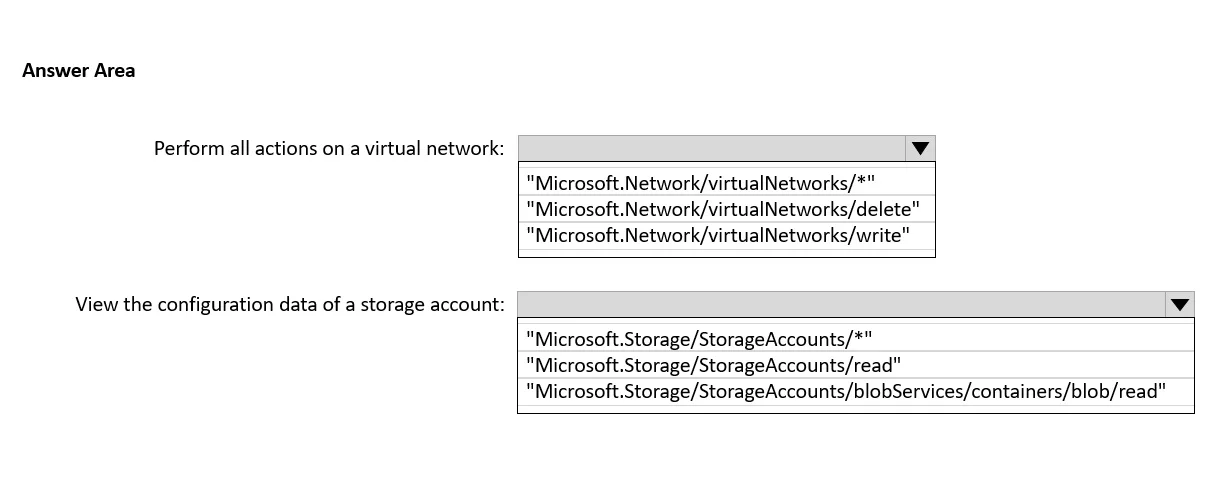
Answer Area
- Perform all actions on a virtual network:"Microsoft.Network/virtualNetworks/*""Microsoft.Network/virtualNetworks/*""Microsoft.Network/virtualNetworks/delete""Microsoft.Network/virtualNetworks/write"
- View the configuration data of a storage account:"Microsoft.Storage/StorageAccounts/read""Microsoft.Storage/StorageAccounts/*""Microsoft.Storage/StorageAccounts/read""Microsoft.Storage/StorageAccounts/blobServices/containers/blob/read"
Explanation
This question tests understanding of Azure RBAC role definition structure, specifically how to assign the minimum necessary permissions (principle of least privilege) for storage account configuration viewing and full virtual network management.
Approach. For viewing storage account configuration data, the correct action to include is 'Microsoft.Storage/storageAccounts/read' - this is a read-only action that allows users to view storage account properties and configuration without granting write or delete permissions, satisfying least privilege. For performing all actions on a virtual network, the correct action is 'Microsoft.Network/virtualNetworks/' - the wildcard () grants all actions (read, write, delete, and other operations) scoped specifically to virtual networks. Using the wildcard on virtualNetworks only (not the entire Microsoft.Network namespace) ensures users get full control over virtual networks without unnecessary permissions on other networking resources like load balancers, NICs, or NSGs.
Concept tested. Azure Role-Based Access Control (RBAC) custom role definition structure - specifically how to use resource provider action strings (e.g., Microsoft.Storage/storageAccounts/read) and wildcards (Microsoft.Network/virtualNetworks/) to grant scoped permissions that adhere to the principle of least privilege. The question distinguishes between read-only actions (ending in /read) and full-access wildcards () at the specific resource type level.
Reference. https://learn.microsoft.com/en-us/azure/role-based-access-control/role-definitions
Topics
Community Discussion
No community discussion yet for this question.