
AZ-104 · Question #655
Hotspot Question You have an Azure AD tenant that contains a user named External User. External User authenticates to the tenant by using [email protected]. You need to ensure that External User…
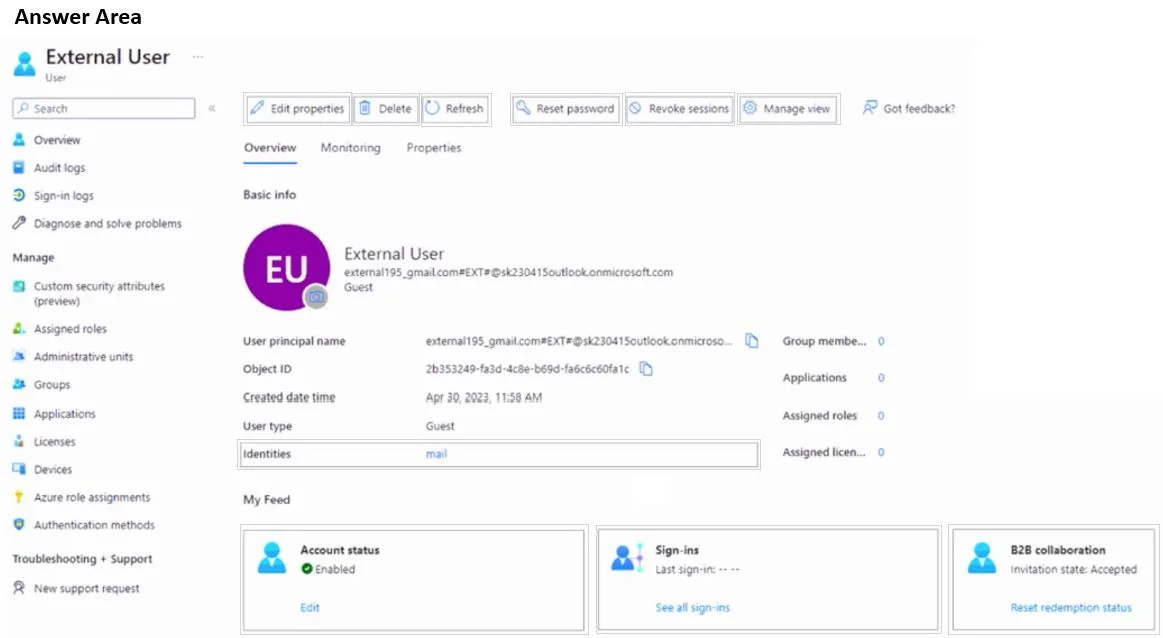
The correct answer is Setting 1 to configure: Edit properties; Setting 2 to configure: Identities. To change a B2B guest user's authentication email, you must edit their properties to update their contact email and then reset their invitation redemption status to allow them to re-authenticate with the new email address.
Question
Exhibit
Answer Area
- Setting 1 to configureEdit propertiesEdit propertiesDeleteRefreshReset passwordRevoke sessionsManage viewGot feedback?
- Setting 2 to configureIdentitiesUser principal nameObject IDCreated date timeUser typeIdentities
Explanation
To change a B2B guest user's authentication email, you must edit their properties to update their contact email and then reset their invitation redemption status to allow them to re-authenticate with the new email address.
Approach. The goal is to change the External User's authentication from '[email protected]' to '[email protected]'. This involves two key steps that are addressable from the Overview blade:
-
Select 'Edit properties': Clicking 'Edit properties' allows an administrator to modify various attributes of the user object. Although the UPN for a B2B guest user might not be directly editable in the same way as an internal user's UPN, the 'mail' attribute (contact email) can be updated to reflect '[email protected]'. This updates the user's profile information to match the new desired email.
-
Select 'Reset redemption status': This action is critical for B2B guest users when their primary authentication email address changes. When the redemption status is reset, the user's previous acceptance of the invitation (which was tied to '[email protected]') is invalidated. The user will then need to re-redeem the invitation, and during this process, they will be prompted to authenticate with their new '[email protected]' identity. This ensures that their Azure AD guest account is correctly linked to the new external identity for future sign-ins. Without resetting the redemption status, the user would likely continue to be associated with their old external email identity.
Common mistakes.
- common_mistake. 1. Not selecting 'Edit properties': Some might overlook editing the user's profile, assuming 'Reset redemption status' alone is sufficient. However, it's good practice to update the user's contact information (via 'Edit properties') to reflect the new email address for consistency and proper identification within the tenant.
- Only selecting 'Edit properties': While 'Edit properties' allows updating the contact email, it does not by itself force the user to re-authenticate with a new external identity if they have already redeemed an invitation with a different one. The 'Reset redemption status' is essential to sever the old identity link and prompt for a new redemption.
- Selecting 'Revoke sessions' or 'Reset password': 'Revoke sessions' only logs out the user; it doesn't change their underlying authentication identity. 'Reset password' is generally for cloud-managed user accounts or federated accounts where Azure AD manages the password, not for B2B guest accounts where authentication is handled by their home tenant.
- Clicking on the empty 'mail' field under Identities: While this field might be where the desired email '[email protected]' would eventually appear, clicking an empty text field directly isn't an 'action' or 'setting to configure' in the context of a hotspot question. The 'Edit properties' button is the interface to modify such fields.
Concept tested. Managing Azure Active Directory (Azure AD) B2B Collaboration guest users, understanding the lifecycle of B2B invitations and redemption, and knowing how to update user properties and authentication methods for guest accounts.
Topics
Community Discussion
No community discussion yet for this question.