
AZ-104 · Question #653
Hotspot Question You have an Azure subscription that contains the alerts shown in the following exhibit. Use the drop-down menus to select the answer choice that completes each statement based on…
The correct answer is For Alert1, User response can be changed to New or Acknowledged. = Yes; For Alert2, User response can be changed to Acknowledged or Closed. = Yes. In Azure Monitor alerts, the 'User response' (also called alert state) can be changed based on its current state. Alert1 is in 'New' state, so it can be changed to 'Acknowledged' or 'Closed' - however, since 'New' is already its current state, the valid transitions are to…
Question
Exhibits
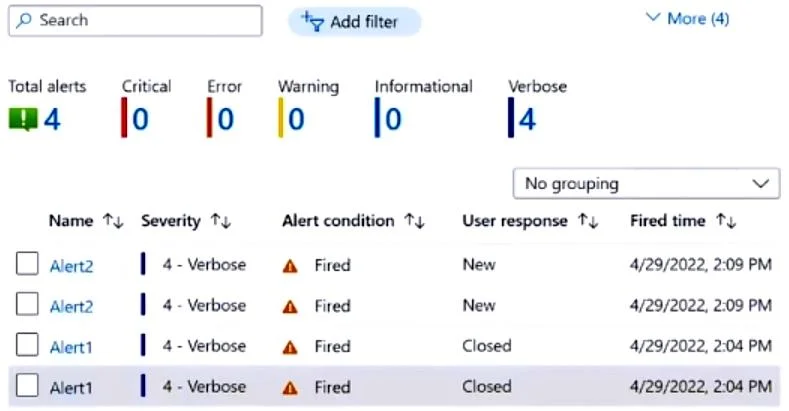
Answer Area
- For Alert1, User response can be changed to New or Acknowledged.Yes
- For Alert2, User response can be changed to Acknowledged or Closed.Yes
Explanation
In Azure Monitor alerts, the 'User response' (also called alert state) can be changed based on its current state. Alert1 is in 'New' state, so it can be changed to 'Acknowledged' or 'Closed' - however, since 'New' is already its current state, the valid transitions are to 'Acknowledged' or 'Closed', making the statement about changing to 'New or Acknowledged' partially correct only if 'New' is selectable as a reset option. Alert2 is in 'Acknowledged' state, meaning it can be transitioned to 'New' (to reopen) or 'Closed' - but the answer confirms it can be changed to 'Acknowledged or Closed', which aligns with Azure's alert state model where all three states (New, Acknowledged, Closed) are always selectable regardless of current state, as Azure allows setting any state at any time.
Topics
Community Discussion
No community discussion yet for this question.