
AZ-104 · Question #626
Hotspot Question Your network contains an on-premises Active Directory Domain Services (AD DS) domain named contoso.com. The domain contains the servers shown in the following table. You plan to…
The correct answer is To move DC1 to VNET1, DC1's IP address should be obtained automatically. = Yes; To move DC1 to VNET1, DC1's IP address should be set to 10.0.1.3. = No; To move DC1 to VNET1, DC1's IP address should be set to 10.0.2.1. = No; To move DC1 to VNET1, DC1's IP address should be set to 192.168.2.1. = No; To ensure member servers in contoso.com can resolve AD DS DNS names, VNET1 should be configured to use a custom DNS server. = Yes; To ensure member servers in contoso.com can resolve AD DS DNS names, VNET1 should be configured to use the default Azure-provided DNS server. = No; To ensure member servers in contoso.com can resolve AD DS DNS names, an Azure Private DNS zone named contoso.com should be created. = No; To ensure member servers in contoso.com can resolve AD DS DNS names, an Azure public DNS zone named contoso.com should be created. = No. Azure AD DS Migration - Hotspot Explanation --- DC1 IP Address Configuration Statement 1: IP should be obtained automatically -> YES When migrating a VM to Azure, you use Azure's built-in DHCP. Azure assigns IPs dynamically from the subnet pool. You should not statically…
Question
Exhibits
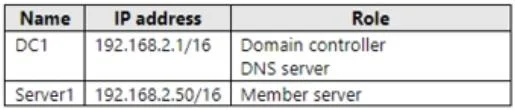
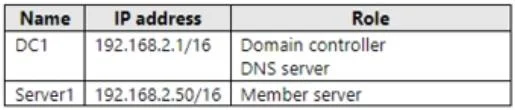
Answer Area
- To move DC1 to VNET1, DC1's IP address should be obtained automatically.Yes
- To move DC1 to VNET1, DC1's IP address should be set to 10.0.1.3.No
- To move DC1 to VNET1, DC1's IP address should be set to 10.0.2.1.No
- To move DC1 to VNET1, DC1's IP address should be set to 192.168.2.1.No
- To ensure member servers in contoso.com can resolve AD DS DNS names, VNET1 should be configured to use a custom DNS server.Yes
- To ensure member servers in contoso.com can resolve AD DS DNS names, VNET1 should be configured to use the default Azure-provided DNS server.No
- To ensure member servers in contoso.com can resolve AD DS DNS names, an Azure Private DNS zone named contoso.com should be created.No
- To ensure member servers in contoso.com can resolve AD DS DNS names, an Azure public DNS zone named contoso.com should be created.No
Explanation
Azure AD DS Migration - Hotspot Explanation
DC1 IP Address Configuration
Statement 1: IP should be obtained automatically -> YES
When migrating a VM to Azure, you use Azure's built-in DHCP. Azure assigns IPs dynamically from the subnet pool. You should not statically configure the OS-level NIC during migration - Azure handles IP assignment via DHCP at the hypervisor level. After migration, you can reserve/make the IP static at the Azure resource level (NIC settings in the portal), not inside the OS.
Statement 2: IP should be set to 10.0.1.3 -> NO
You don't manually set a static IP inside the VM's OS in Azure. Even though 10.0.1.3 is a valid address in Subnet1 (10.0.1.0/24), hardcoding this in the OS is not the correct Azure pattern. Azure reserves .1-.3 in every subnet for platform use, making 10.0.1.3 reserved and invalid for assignment anyway.
Statement 3: IP should be set to 10.0.2.1 -> NO
10.0.2.x doesn't exist in the defined subnet (10.0.1.0/24). While it's within the VNet address space (10.0.0.0/16), no subnet named for that range was created. Assigning this would place DC1 outside any valid subnet.
Statement 4: IP should be set to 192.168.2.1 -> NO
192.168.2.1 is an on-premises RFC 1918 address - entirely outside the Azure VNet (10.0.0.0/16). Assigning this would make DC1 unreachable within Azure.
DNS Resolution for Member Servers
Statement 5: VNET1 should use a custom DNS server -> YES
AD DS depends on AD-integrated DNS for SRV records, domain controller locator records, and name resolution specific to contoso.com. Azure-provided DNS has no knowledge of these internal AD records. You must configure VNET1's DNS settings to point to DC1's IP so all VMs in the VNet use DC1 as their DNS resolver.
Statement 6: VNET1 should use the default Azure-provided DNS -> NO
Azure's default DNS (168.63.129.16) resolves Azure public and internal hostnames only. It cannot resolve contoso.com AD DS records (SRV _ldap._tcp.contoso.com, _kerberos._tcp.contoso.com, etc.). Member servers would fail to locate domain controllers.
Statement 7: Azure Private DNS zone contoso.com -> NO
Azure Private DNS zones are designed for Azure-native services and simple A/CNAME records. They cannot host the dynamic SRV and other AD DS records that Active Directory requires. AD DS DNS must run on a Windows DNS server (DC1 itself).
Statement 8: Azure public DNS zone contoso.com -> NO
A public DNS zone is internet-facing. Internal AD DS records must never be exposed publicly, and public DNS zones don't integrate with private VNet resolution for internal clients anyway.
Memory Tips
| Concept | Tip |
|---|---|
| Azure reserved IPs | Azure always reserves .0, .1, .2, .3, and .255 in every subnet - never assign these |
| IP in Azure VMs | "Static" in Azure = reserve at the NIC resource level, not inside the OS |
| AD DS + Azure DNS | AD needs SRV records -> only a Windows DNS server on DC1 can host them |
| Private DNS zone vs. AD DNS | Private DNS zone = simple records for Azure services; AD DNS = dynamic, SRV-rich, Windows-only |
Key rule to remember: When migrating an AD DC to Azure, always point the VNet's custom DNS to the DC's IP - before other VMs join, or they won't find the domain.
Topics
Community Discussion
No community discussion yet for this question.