
AZ-104 · Question #574
Hotspot Question You have an Azure subscription that contains a storage account named storage1. The storage1 account contains a container named container1. You to create a lifecycle management rule…
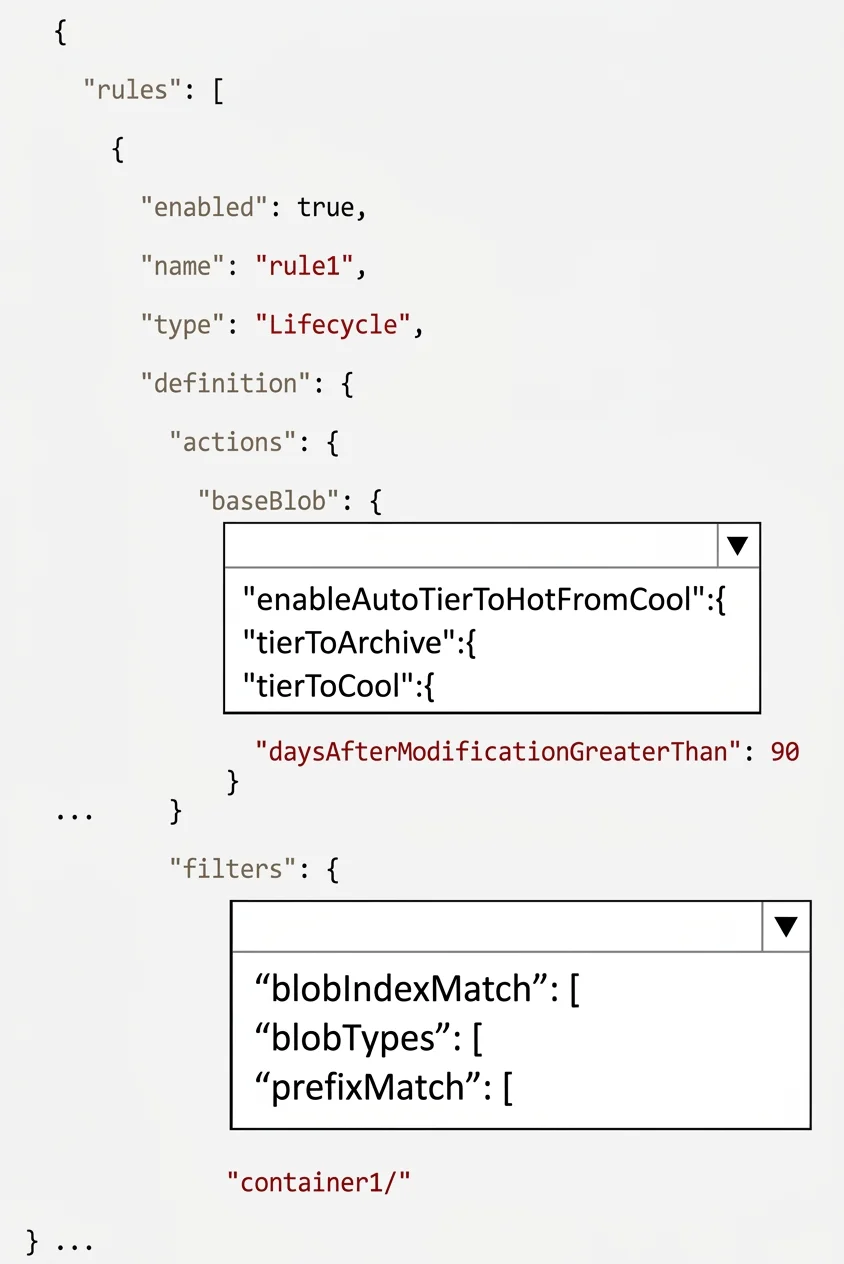
The correct answer is baseBlob: "tierToArchive":{; filters: "prefixMatch":[. This question tests knowledge of Azure Blob Storage lifecycle management policies, specifically how to configure a rule that moves blobs to the lowest-cost tier after 90 days of inactivity.
Question
Exhibits
Answer Area
- baseBlob"tierToArchive":{"enableAutoTierToHotFromCool":{"tierToArchive":{"tierToCool":{
- filters"prefixMatch":["blobIndexMatch":["blobTypes":["prefixMatch":[
Explanation
This question tests knowledge of Azure Blob Storage lifecycle management policies, specifically how to configure a rule that moves blobs to the lowest-cost tier after 90 days of inactivity.
Approach. The correct rule should use 'tierToArchive' as the action (not tierToCool or tierToHot), since Archive is the lowest-cost storage tier in Azure. The condition should be 'daysAfterModificationGreaterThan' set to 90, which triggers the action after the blob has not been modified for 90 days. The rule should apply to 'blockBlob' type with a filter targeting container1 as the prefix, and the rule definition should include 'enabled: true'. Archive tier is the cheapest option in Azure Blob Storage, making it the correct destination for a 'lowest-cost' requirement.
Concept tested. Azure Blob Storage lifecycle management policies allow automatic tiering of blobs based on age or last access time. The three tiers from hottest/most expensive to coldest/cheapest are: Hot → Cool → Archive. A lifecycle rule uses JSON or the portal UI to specify actions (tierToCool, tierToArchive, delete) and conditions (daysAfterModificationGreaterThan, daysAfterLastAccessTimeGreaterThan). Since the question asks for the 'lowest-cost tier,' the answer is Archive, and the time condition is 90 days after last modification.
Reference. https://learn.microsoft.com/en-us/azure/storage/blobs/lifecycle-management-policy-configure
Topics
Community Discussion
No community discussion yet for this question.