
AZ-104 · Question #456
Case Study 5 - Contoso, Ltd Overview General Overview Contoso, Ltd. is a consulting company that has a main office in Montreal and branch offices in Seattle and New York. Environment Existing…
To create a Cool tier blob container, General-purpose v2 (GPv2) storage accounts are required, while for a 'Cool' (standard) file share, a GPv2 account is typically best.
Question
Exhibit
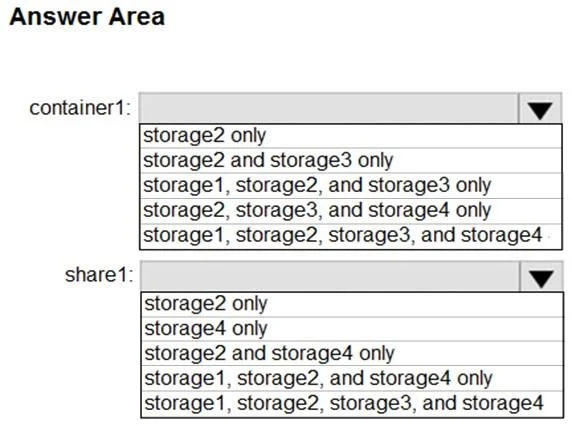
Answer Area
- container1:storage2 onlystorage2 and storage3 onlystorage1, storage2, and storage3 onlystorage2, storage3, and storage4 onlystorage1, storage2, storage3, and storage4
- share1:storage2 onlystorage4 onlystorage2 and storage4 onlystorage1, storage2, and storage4 onlystorage1, storage2, storage3, and storage4
Explanation
To create a Cool tier blob container, General-purpose v2 (GPv2) storage accounts are required, while for a 'Cool' (standard) file share, a GPv2 account is typically best.
Approach. To answer correctly, we must consider the requirements for creating a 'blob container named container1' and a 'file share named share1' that 'will use the Cool storage tier'.
-
For 'container1' (blob container with Cool tier):
- Azure Blob storage supports Hot, Cool, and Archive access tiers. To use the Cool tier for a blob container, the underlying storage account must be a General-purpose v2 (GPv2) account. Older General-purpose v1 (GPv1) accounts only support the Hot tier for blobs, and specialized BlockBlobStorage accounts are also typically optimized for Hot tier block blobs.
- Therefore, the selection 'storage2 and storage3 only' implies that
storage2andstorage3are the GPv2 accounts in the existing environment that can host Cool tier blobs. This meansstorage1andstorage4are either GPv1, BlockBlobStorage, or FileStorage accounts, which do not support Cool tier for blobs.
-
For 'share1' (file share with Cool tier):
- Azure Files itself doesn't have direct Hot/Cool/Archive tiers in the same way blobs do. The 'Cool storage tier' requirement for a file share typically implies a standard, cost-effective file share. Standard file shares are best hosted on General-purpose v2 (GPv2) accounts (or GPv1 accounts, though GPv2 is generally recommended for new deployments). Premium file shares require FileStorage accounts, which would not align with a 'Cool' (cost-effective) tier requirement.
- From the
container1deduction, we knowstorage2is a GPv2 account, which is capable of hosting standard file shares. The selection 'storage2 only' indicates that among the available options, onlystorage2is considered suitable for this requirement. - This implies that
storage3(which we deduced as GPv2 for blobs) is, for an unstated reason within the context of this specific question, not considered suitable for file shares. This could be due to a specific configuration not provided in the case study's missing 'storage accounts' table, or it might be a subtle nuance the question intends to test. It also implies thatstorage1andstorage4are not suitable for standard/Cool tier file shares (e.g.,storage1is GPv1,storage4is a FileStorage account for premium files or a BlockBlobStorage account that cannot host files at all).
Common mistakes.
- common_mistake. A common mistake is selecting storage account types that do not support the specified storage tier or service. For 'container1', choosing any account other than GPv2 (e.g., GPv1 or BlockBlobStorage) would be incorrect because they do not support the Cool tier for blobs. For 'share1', selecting a FileStorage account (if
storage4were one) would be wrong because FileStorage accounts are for Premium file shares, not 'Cool' (standard/cost-effective) ones. Another mistake forshare1would be assuming all GPv2 accounts (likestorage3, which is suitable for Cool blobs) are always suitable for file shares, without considering potential unstated limitations or specific configurations that the question implies through its chosen correct answer. Selectingstorage1forshare1would also be incorrect ifstorage1is a GPv1 account, which, while capable of hosting standard file shares, might be deemed less optimal or not align with the 'Cool tier' implication compared to a GPv2 account, or be explicitly unsuitable for other unstated reasons within the case study.
Concept tested. Understanding Azure Storage account types (General-purpose v1, General-purpose v2, BlockBlobStorage, FileStorage) and their specific capabilities regarding supported services (blobs, files) and access tiers (Hot, Cool, Archive, Standard, Premium). This includes knowing which account types support the Cool tier for blob storage and what 'Cool tier' implies for Azure file shares.
Topics
Community Discussion
No community discussion yet for this question.