
AZ-104 · Question #379
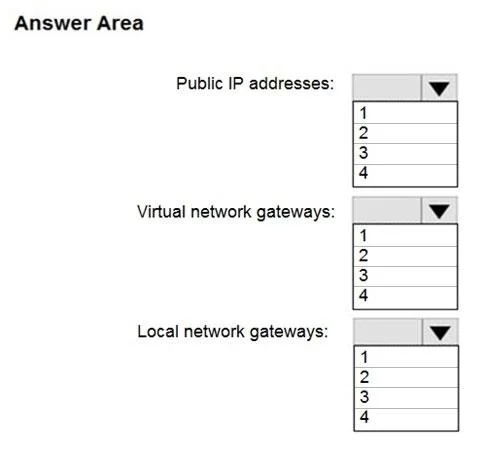
Hotspot Question You have an on-premises data center and an Azure subscription. The data center contains two VPN devices. The subscription contains an Azure virtual network named VNet1. VNet1…
This question tests knowledge of Azure VPN Gateway high availability configurations, specifically the active-active VPN gateway setup combined with dual on-premises VPN devices to eliminate single points of failure.
Question
Exhibit
Answer Area
- Public IP addresses:1234
- Virtual network gateways:1234
- Local network gateways:1234
Explanation
This question tests knowledge of Azure VPN Gateway high availability configurations, specifically the active-active VPN gateway setup combined with dual on-premises VPN devices to eliminate single points of failure.
Approach. To ensure no single failure (Azure gateway instance OR on-premises VPN device) causes an interruption longer than 2 minutes, you need an active-active Azure VPN gateway configuration combined with two on-premises VPN devices. An active-active VPN gateway requires 2 public IP addresses (one for each gateway instance) and uses a single virtual network gateway configured in active-active mode. Since there are two on-premises VPN devices, you need 2 local network gateways (one representing each on-premises VPN device). Therefore, the minimum required is: 2 public IP addresses, 1 virtual network gateway (in active-active mode), and 2 local network gateways. In active-active mode, both gateway instances are active simultaneously and each connects to both on-premises VPN devices, creating 4 tunnels total, ensuring that any single failure (one Azure instance or one on-premises device) results in a sub-2-minute failover since the remaining tunnels are already established.
Concept tested. Azure VPN Gateway high availability using active-active configuration with dual on-premises VPN devices. The key insight is that active-active mode (not active-standby) is required to meet the <2 minute recovery SLA, as active-standby failover can take 10-15 seconds to 1-3 minutes but active-active keeps tunnels pre-established. Active-active requires 2 public IPs but only 1 VNet gateway resource, while 2 local network gateways represent the two on-premises devices.
Reference. https://docs.microsoft.com/en-us/azure/vpn-gateway/vpn-gateway-highlyavailable
Topics
Community Discussion
No community discussion yet for this question.