
AZ-104 · Question #307
Hotspot Question You have an Azure subscription that contains the Azure virtual machines shown in the following table. You add inbound security rules to a network security group (NSG) named NSG1 as…
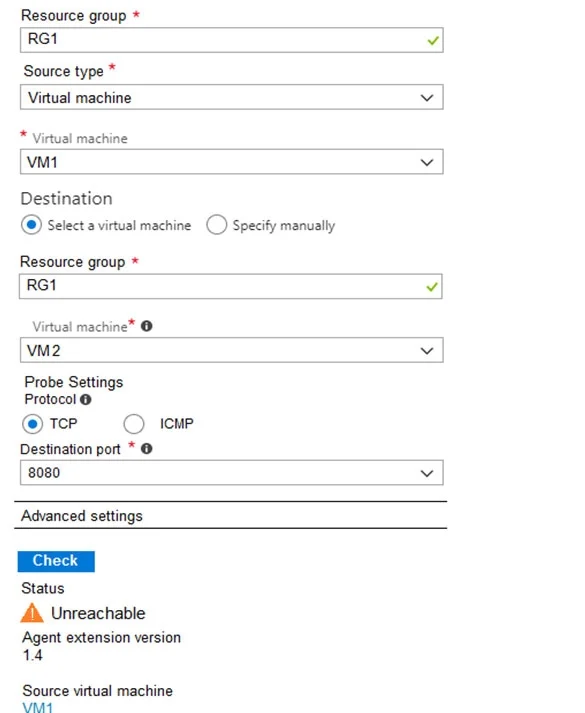
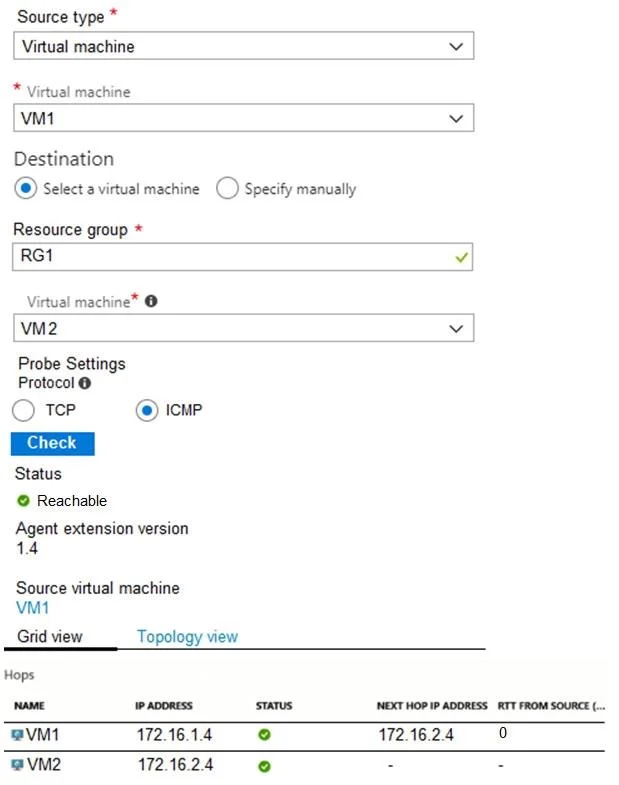
The correct answer is The Resource group for the source is RG1. = Yes; The Source type is Virtual machine. = Yes; The source Virtual machine is VM1. = Yes; The Destination option 'Select a virtual machine' is chosen. = Yes; The Resource group for the destination is RG1. = Yes; The Virtual machine for the destination is VM2. = Yes; The Protocol chosen is TCP. = Yes; The Destination port is 8080. = Yes; The Status shown is Unreachable. = Yes; The Agent extension version is 1.4. = Yes; The Source virtual machine listed at the bottom is VM1. = Yes. The exhibits demonstrate Azure Network Watcher tests where ICMP traffic succeeds but TCP 8080 fails, indicating an inbound NSG rule on the destination VM within the same Virtual Network.
Question
Exhibits
Answer Area
- The Resource group for the source is RG1.Yes
- The Source type is Virtual machine.Yes
- The source Virtual machine is VM1.Yes
- The Destination option 'Select a virtual machine' is chosen.Yes
- The Resource group for the destination is RG1.Yes
- The Virtual machine for the destination is VM2.Yes
- The Protocol chosen is TCP.Yes
- The Destination port is 8080.Yes
- The Status shown is Unreachable.Yes
- The Agent extension version is 1.4.Yes
- The Source virtual machine listed at the bottom is VM1.Yes
Explanation
The exhibits demonstrate Azure Network Watcher tests where ICMP traffic succeeds but TCP 8080 fails, indicating an inbound NSG rule on the destination VM within the same Virtual Network.
Approach. 1. 'NSG1 limits VM1 traffic' -> No. The scenario explicitly states that inbound security rules were added to NSG1. Inbound rules apply to the destination receiving the traffic, meaning they do not restrict the outbound traffic originating from VM1. 2. 'NSG1 applies to VM2' -> Yes. Because TCP 8080 is blocked but ICMP is allowed, and the rules created were inbound, NSG1 must be applied to VM2 (either its subnet or NIC) to filter traffic arriving at VM2. 3. 'VM1 and VM2 connect to the same virtual network' -> Yes. The network hops in Exhibit 2 show traffic flowing directly from VM1's IP to VM2's IP without traversing an intermediate router or gateway. Default system routes in Azure allow direct communication between subnets within the same Virtual Network.
Common mistakes.
- common_mistake. A common mistake is assuming that because the IPs are in different subnets (172.16.1.4 vs 172.16.2.4), the VMs must be in different Virtual Networks. A single VNet can encompass a large address space (e.g., 172.16.0.0/16) and be divided into multiple smaller subnets that route to each other by default.
Concept tested. Azure Network Watcher (Connection Monitor/Troubleshoot), Network Security Groups (Inbound vs. Outbound rules), and Default Virtual Network Routing.
Reference. https://learn.microsoft.com/en-us/azure/virtual-network/network-security-groups-overview
Topics
Community Discussion
No community discussion yet for this question.