
AZ-104 · Question #306
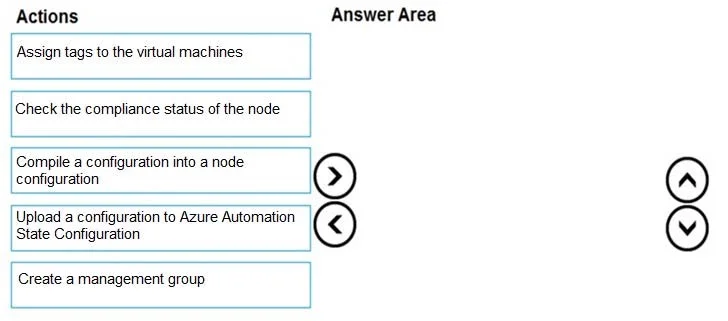
Drag and Drop Question You onboard 10 Azure virtual machines to Azure Automation State Configuration. You need to use Azure Automation State Configuration to manage the ongoing consistency of the…
The correct answer is Upload a configuration to Azure Automation State Configuration; Compile a configuration into a node configuration; Check the compliance status of the node. The correct sequence follows the Azure Automation State Configuration workflow: first, you upload a PowerShell DSC configuration script to Azure Automation, then compile it into a node configuration (MOF file) that can be assigned to nodes, and finally check the compliance…
Question
Exhibits
Answer Area
Drag items
Correct arrangement
- Upload a configuration to Azure Automation State Configuration
- Compile a configuration into a node configuration
- Check the compliance status of the node
Explanation
The correct sequence follows the Azure Automation State Configuration workflow: first, you upload a PowerShell DSC configuration script to Azure Automation, then compile it into a node configuration (MOF file) that can be assigned to nodes, and finally check the compliance status to verify the VMs are maintaining the desired state. Since the VMs are already onboarded, the remaining step is to define, compile, and monitor the configuration - making these three steps the complete management workflow.
Topics
Community Discussion
No community discussion yet for this question.