
AZ-104 · Question #305
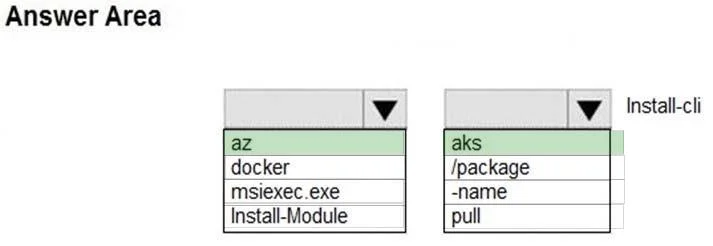
Hotspot Question You have an Azure Kubernetes Service (AKS) cluster named AKS1 and a computer named Computer1 that runs Windows 10. Computer1 that has the Azure CLI installed. You need to install…
The correct answer is First part of command: az; Second part of command: aks. This question tests knowledge of the Azure CLI command used to install the kubectl client tool on a local machine. kubectl is the Kubernetes command-line tool that allows you to run commands against Kubernetes clusters.
Question
Exhibit
Answer Area
- First part of commandazazdockermsiexec.exeInstall-Module
- Second part of commandaksaks/package-namepull
Explanation
This question tests knowledge of the Azure CLI command used to install the kubectl client tool on a local machine. kubectl is the Kubernetes command-line tool that allows you to run commands against Kubernetes clusters.
Approach. The correct command to install kubectl on Computer1 using the Azure CLI is 'az aks install-cli'. This command downloads and installs the kubectl binary on the local machine, making it available for managing Kubernetes clusters including AKS1. The full command syntax is 'az aks install-cli', and it can be run from the Azure CLI on Windows 10 without needing to separately download kubectl from the Kubernetes website. After installation, you would then use 'az aks get-credentials --resource-group <ResourceGroup> --name AKS1' to configure kubectl to connect to the AKS1 cluster.
Concept tested. The concept being tested is knowledge of Azure CLI commands for managing Azure Kubernetes Service (AKS). Specifically, understanding that 'az aks install-cli' is the correct Azure CLI subcommand to install the kubectl client tool on a local machine, as opposed to other az aks subcommands like 'az aks create', 'az aks get-credentials', 'az aks browse', or 'az aks update'. Candidates must also know the correct parent command group ('az aks') rather than alternatives like 'az acr', 'az container', or standalone kubectl installation methods.
Reference. https://docs.microsoft.com/en-us/cli/azure/aks?view=azure-cli-latest#az_aks_install_cli
Topics
Community Discussion
No community discussion yet for this question.