
AZ-104 · Question #108
Hotspot Question You have an Azure subscription named Subscription1. Subscription1 contains two Azure virtual machines named VM1 and VM2. VM1 and VM2 run Windows Server 2016. VM1 is backed up daily…
The correct answer is You can perform a file recovery of VM1 to:: Any Windows computer that has Internet connectivity; You can restore VM1 to:: VM1 or a new Azure virtual machine only. This question tests the understanding of Azure Backup's distinct capabilities for IaaS VMs: file-level recovery (to any internet-connected Windows machine) versus full VM restoration (to the original VM or a new Azure VM).
Question
Exhibit
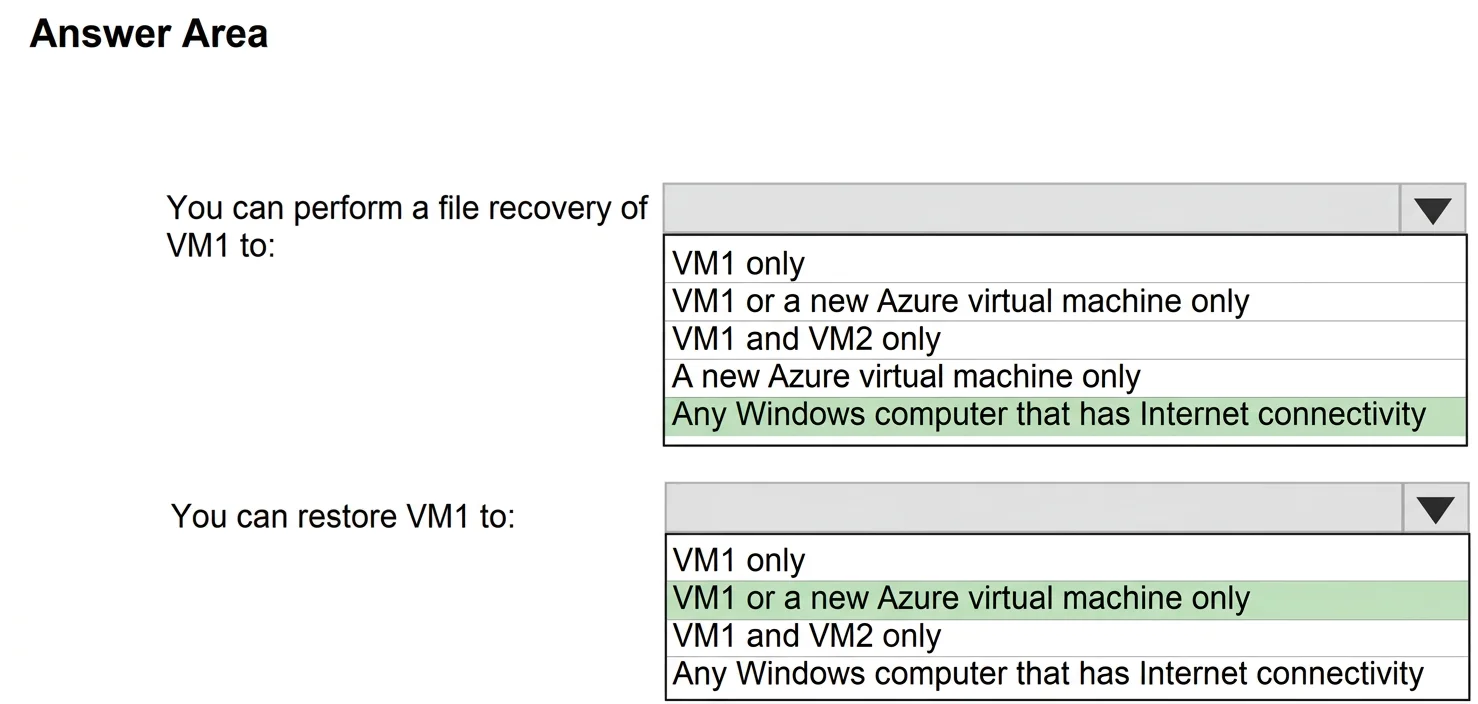
Answer Area
- You can perform a file recovery of VM1 to:Any Windows computer that has Internet connectivityVM1 onlyVM1 or a new Azure virtual machine onlyVM1 and VM2 onlyA new Azure virtual machine onlyAny Windows computer that has Internet connectivity
- You can restore VM1 to:VM1 or a new Azure virtual machine onlyVM1 onlyVM1 or a new Azure virtual machine onlyVM1 and VM2 onlyAny Windows computer that has Internet connectivity
Explanation
This question tests the understanding of Azure Backup's distinct capabilities for IaaS VMs: file-level recovery (to any internet-connected Windows machine) versus full VM restoration (to the original VM or a new Azure VM).
Approach. To answer the first part, 'You can perform a file recovery of VM1 to:', the correct selection is 'Any Windows computer that has Internet connectivity'. Azure Backup for IaaS VMs allows granular file-level recovery. This process involves downloading a script from the Azure portal that, when executed on any Windows computer (physical or virtual, on-premises or in Azure) with Internet connectivity, establishes an iSCSI connection to the backup's recovery point. This mounts the recovery point as a local drive, enabling you to browse and copy specific files or folders. This offers great flexibility for data retrieval, especially in scenarios like ransomware where direct access to the original VM might be compromised.
To answer the second part, 'You can restore VM1 to:', the correct selection is 'VM1 or a new Azure virtual machine only'. When performing a full VM restore from an Azure IaaS VM backup, Azure provides two main options: 1) restoring to the original VM (VM1), which replaces its existing disks with those from the backup, effectively reverting it to a previous state, or 2) restoring to a new Azure virtual machine. Restoring to a new VM creates a completely new VM instance using the backup's disks, allowing you to specify a different resource group, virtual network, or even a different subscription (within the same region as the Recovery Services vault). This is often preferred in disaster recovery or to test restoration without impacting the original VM.
Common mistakes.
- common_mistake. For file recovery, selecting options like 'VM1 only' or 'A new Azure virtual machine only' is incorrect because the file recovery capability is more flexible and allows mounting the recovery point on any suitable Windows computer, not just an Azure VM. 'VM1 and VM2 only' is also incorrect as VM2 is unrelated to VM1's backup for file recovery targets. For a full VM restore, selecting 'VM1 only' is too restrictive, as restoring to a new VM is also a valid and common option. 'VM1 and VM2 only' is wrong because you cannot restore VM1's entire operating system and data onto VM2; you can only restore VM1 to its original state or as a new, independent VM. Lastly, 'Any Windows computer that has Internet connectivity' is incorrect for a full VM restore because Azure IaaS VMs are restored within the Azure infrastructure, not to an arbitrary external computer; this option is only applicable for file-level recovery. The mention of 'without using the Azure Backup agent' is a red herring, as Azure IaaS VM backups (snapshot-based) inherently do not use the MARS agent for VM-level backup, distinguishing them from file/folder backups from within a server.
Concept tested. The core concept tested is the comprehensive understanding of Azure Backup capabilities for Infrastructure-as-a-Service (IaaS) virtual machines, specifically differentiating between the target locations and processes for performing a granular file-level recovery versus a full virtual machine restore. It also implicitly tests knowledge about how Azure Backup works for IaaS VMs (snapshot-based, without requiring the MARS agent for VM backup).
Topics
Community Discussion
No community discussion yet for this question.