
AZ-104 · Question #109
Hotspot Question You purchase a new Azure subscription named Subscription1. You create a virtual machine named VM1 in Subscription1. VM1 is not protected by Azure Backup. You need to protect VM1 by…
To protect an Azure VM with Azure Backup, backups are stored in a Recovery Services vault and configured using a backup policy that specifies the schedule and retention.
Question
Exhibit
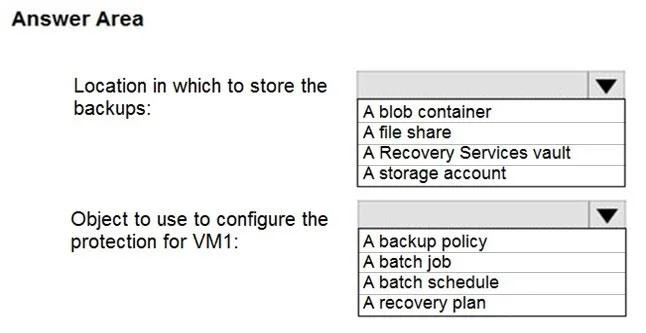
Answer Area
- Location in which to store the backups:A blob containerA file shareA Recovery Services vaultA storage account
- Object to use to configure the protection for VM1:A backup policyA batch jobA batch scheduleA recovery plan
Explanation
To protect an Azure VM with Azure Backup, backups are stored in a Recovery Services vault and configured using a backup policy that specifies the schedule and retention.
Approach. The correct interaction involves selecting 'A Recovery Services vault' for the backup storage location and 'A backup policy' for configuring VM protection.
- Location in which to store the backups: For Azure Virtual Machine backups, the dedicated and primary resource used to store the backups is a Recovery Services vault. This vault is a management entity that stores recovery points created over time and provides an interface for managing backups and restores.
- Object to use to configure the protection for VM1: To define the backup schedule (e.g., daily at 01:00) and the retention period (e.g., 30 days), Azure Backup utilizes a backup policy. This policy is associated with the Recovery Services vault and applied to the specific VM to be protected.
Common mistakes.
- common_mistake. Other choices are incorrect because they either refer to general storage components not directly managed for VM backups, or to different Azure services or concepts:
- A blob container / A storage account: While Azure Backup internally uses Azure Storage accounts and blob containers to store the actual backup data, you do not directly specify or manage a blob container or storage account as the destination when configuring Azure VM backups. The Recovery Services vault abstracts this underlying storage.
- A file share: An Azure file share is a different storage service used for file storage, and while it can be backed up by Azure Backup, it is not the location where Azure VM backups are stored.
- A batch job / A batch schedule: These refer to Azure Batch services, which are used for running large-scale parallel and high-performance computing (HPC) applications, not for configuring Azure VM backups.
- A recovery plan: A recovery plan is a component of Azure Site Recovery (ASR) used for orchestrating the failover and failback of virtual machines to a secondary region for disaster recovery purposes. While ASR also uses Recovery Services vaults, a recovery plan is distinct from a backup policy, which focuses on point-in-time data recovery.
Concept tested. The core concept being tested is the architecture and components of Azure Backup for Virtual Machines, specifically understanding the role of a Recovery Services vault as the central repository for backups and a backup policy for defining backup schedules and retention settings.
Topics
Community Discussion
No community discussion yet for this question.