
AZ-104 · Question #377
Hotspot Question You have an Azure virtual network named VNet1 that connects to your on-premises network by using a site-to-site VPN. VMet1 contains one subnet named Subnet1. Subnet1 is associated…
This question tests knowledge of Azure network monitoring tools, specifically how to collect network flow data from NSGs and query that data interactively from the Azure portal.
Question
Exhibits
Answer Area
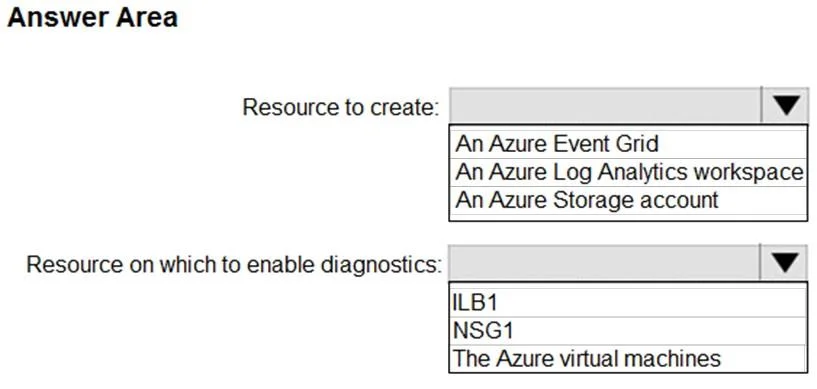
- Resource to create:An Azure Event GridAn Azure Log Analytics workspaceAn Azure Storage account
- Resource on which to enable diagnostics:ILB1NSG1The Azure virtual machines
Explanation
This question tests knowledge of Azure network monitoring tools, specifically how to collect network flow data from NSGs and query that data interactively from the Azure portal.
Approach. To collect data about IP addresses connecting to ILB1, you should enable NSG Flow Logs on NSG1, which captures information about IP traffic flowing through the NSG including source/destination IP addresses, ports, and protocols. The flow log data should be sent to a Log Analytics Workspace, which allows you to run interactive Kusto Query Language (KQL) queries directly from the Azure portal using Log Analytics. Specifically, you would enable NSG Flow Logs (version 2 for richer data) on NSG1 and configure traffic analytics or direct Log Analytics integration to store the data, then use the Log Analytics workspace in the Azure portal to run interactive queries against the collected IP connection data.
Concept tested. The concept tested is Azure Network Watcher NSG Flow Logs combined with Log Analytics (Azure Monitor Logs). NSG Flow Logs record network traffic information at the NSG level, capturing source and destination IPs, ports, protocol, and whether traffic was allowed or denied. Log Analytics provides the interactive query capability via the Azure portal using KQL. Alternative tools like Azure Storage Account alone would store the raw JSON logs but would not support interactive queries from the portal. Network Performance Monitor or Connection Monitor would not capture the same IP-level flow data. Traffic Analytics built on top of NSG Flow Logs and Log Analytics provides visual dashboards and interactive queries, making it the complete solution for this scenario.
Reference. https://docs.microsoft.com/en-us/azure/network-watcher/network-watcher-nsg-flow-logging-overview
Topics
Community Discussion
No community discussion yet for this question.