
800-150 · Question #87
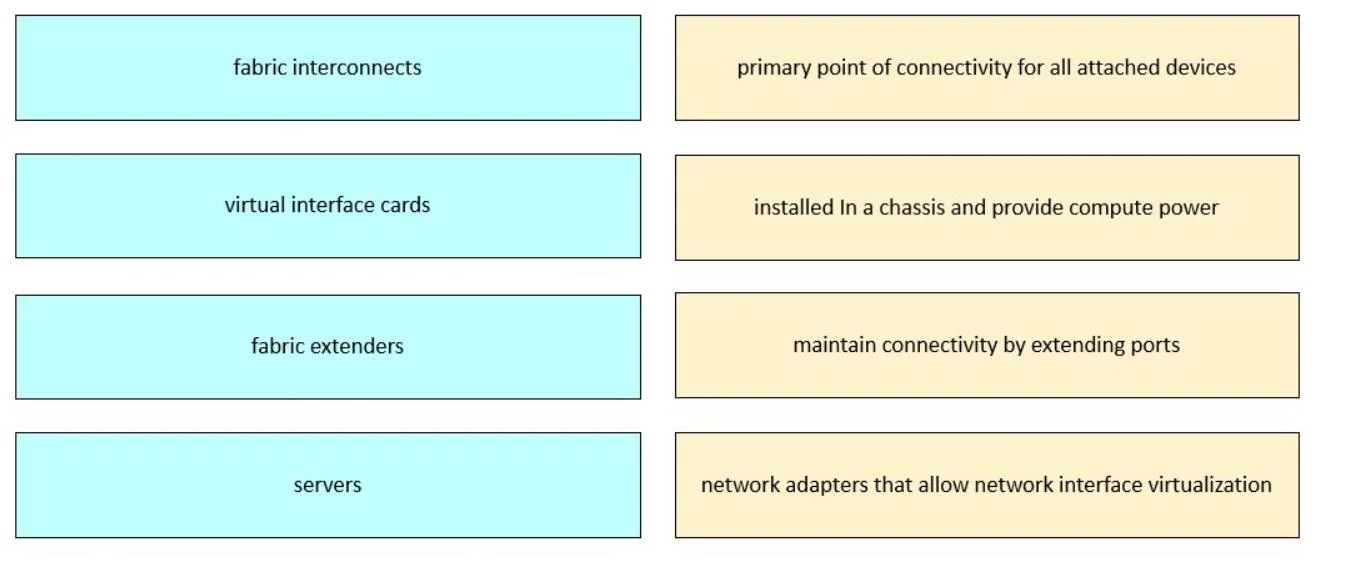
Drag and Drop Question Drag and drop the Cisco UCS components from the left onto the corresponding functionalities on the right. Answer:
The correct answer is fabric interconnects; servers; fabric extenders; virtual interface cards. Cisco UCS Component Functionalities - Drag & Drop Explained > Note: The question omits the right-side functionality labels. The explanation below is based on the standard Cisco UCS architecture roles that map to this ordering in typical exam questions. --- The Architecture at a…
Question
Drag and Drop Question Drag and drop the Cisco UCS components from the left onto the corresponding functionalities on the right. Answer:
Exhibit
Answer Area
Drag items
Correct arrangement
- fabric interconnects
- servers
- fabric extenders
- virtual interface cards
Explanation
Cisco UCS Component Functionalities - Drag & Drop Explained
Note: The question omits the right-side functionality labels. The explanation below is based on the standard Cisco UCS architecture roles that map to this ordering in typical exam questions.
The Architecture at a Glance
Cisco UCS uses a hierarchical architecture: management/switching → compute → connectivity extension → adapter virtualization. The arrangement follows this top-down logical flow.
Item-by-Item Breakdown
1. Fabric Interconnects → Central Management & Switching
Fabric Interconnects (FIs) are the brain and backbone of a UCS domain. They:
- Act as the single point of management for all UCS components
- Provide Ethernet and Fibre Channel switching
- Host Cisco UCS Manager
They go first because everything else in UCS is subordinate to them.
Common mistake: Confusing FIs with standard LAN switches. FIs are purpose-built UCS management + switching devices, not general-purpose switches.
2. Servers → Compute Resources
Servers (blade or rack) provide CPU and memory to run workloads. They are the target of all policy and connectivity that the FIs manage.
Common mistake: Assuming servers operate independently - in UCS, servers are always managed through the FI; they have no out-of-band management of their own.
3. Fabric Extenders → Chassis-to-FI Connectivity
Fabric Extenders (FEX / I/O Modules) extend the FI fabric down into blade chassis or to rack servers. They act as remote line cards of the FI - they have no independent switching logic.
Common mistake: Treating FEX as a switch. They forward all decisions upstream to the FI; they do not make local switching decisions.
4. Virtual Interface Cards (VIC) → Adapter Virtualization
VICs (e.g., Cisco UCS VIC 1340) sit inside the server and virtualize the physical adapter into multiple virtual NICs and HBAs via software policy. This enables stateless computing - the server's identity (MAC, WWN, boot policy) is defined in UCS Manager, not burned into hardware.
Common mistake: Confusing VICs with standard NICs. VICs are programmable and their interfaces are entirely defined by UCS service profiles, not hardware.
Summary Table
| # | Component | Role |
|---|---|---|
| 1 | Fabric Interconnects | Management plane + switching fabric |
| 2 | Servers | Compute (CPU/RAM) for workloads |
| 3 | Fabric Extenders | Extend FI fabric to chassis/rack |
| 4 | Virtual Interface Cards | Virtualize NICs/HBAs within a server |
The ordering reflects the dependency chain: FIs manage everything → servers need connectivity → FEX provides that link → VICs present virtual interfaces to the server OS.
Topics
Community Discussion
No community discussion yet for this question.