
800-150 · Question #40
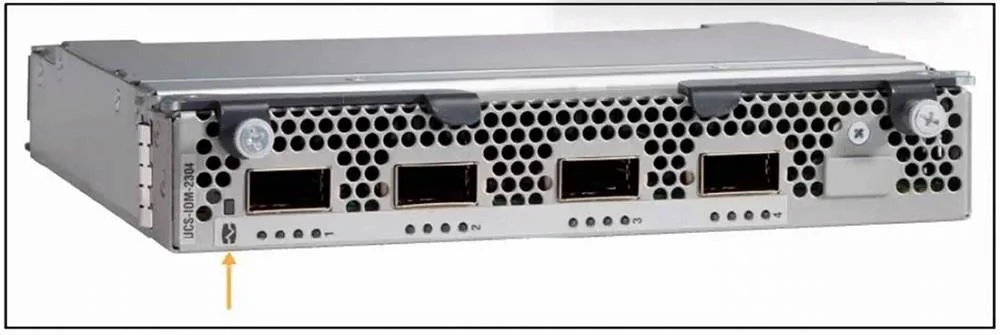
Refer to the exhibit. Which component is highlighted on the Cisco I/O module image?
The correct answer is B. chassis connections LED. The highlighted component on the Cisco I/O module is the chassis connections LED, which indicates the status of connectivity between the I/O module and the chassis. In the exhibit, the orange arrow points to a small rectangular LED indicator located to the left side of the I/O…
Question
Refer to the exhibit. Which component is highlighted on the Cisco I/O module image?
Exhibit
Options
- Acaptive screw
- Bchassis connections LED
- Cfan module LED
- Dfixed port
How the community answered
(16 responses)- B88% (14)
- C6% (1)
- D6% (1)
Explanation
The highlighted component on the Cisco I/O module is the chassis connections LED, which indicates the status of connectivity between the I/O module and the chassis. In the exhibit, the orange arrow points to a small rectangular LED indicator located to the left side of the I/O module (Cisco UCS-IOM-2304). This specific LED is not aligned with the ports, fans, or screws, which helps identify it correctly. Chassis connections LED (B) is responsible for indicating the status of uplink/downlink communication between the I/O module and the chassis. Green usually indicates a healthy link. Amber or off may indicate a problem or no connection.
Topics
Community Discussion
No community discussion yet for this question.