
Microsoft
70-778 · Question #40
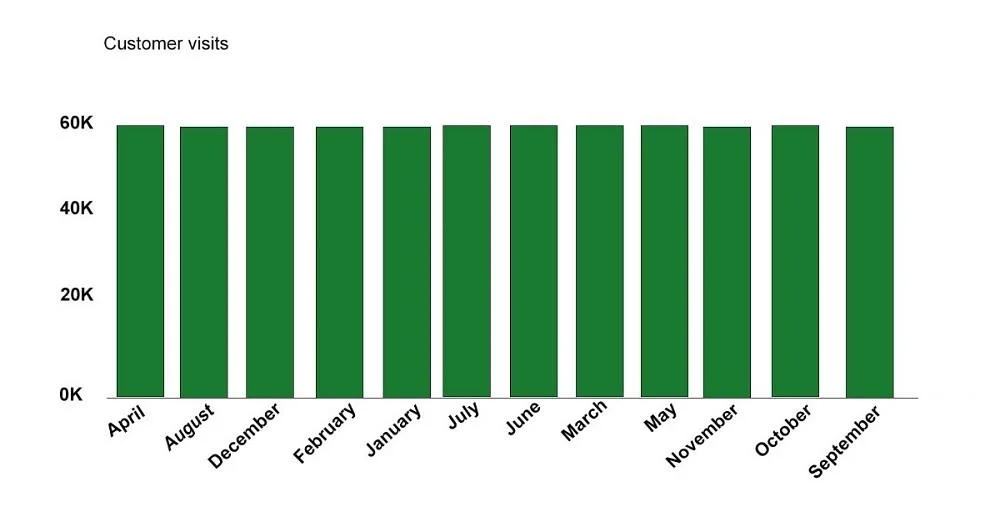
You have two tables named CustomerVisits and Date in a Power BI model. You create a measure to calculate the number of customer visits. You use the measure in the report shown in the exhibit. (Click…
The correct answer is A. Create a relationship between the CustomerVisits table and the Date table. https://docs.microsoft.com/en-us/power-bi/desktop-create-and-manage-relationships https://docs.microsoft.com/en-us/power-bi/desktop-tutorial-create-measures
Model and Visualize Data by Using Power BI Desktop
Question
You have two tables named CustomerVisits and Date in a Power BI model. You create a measure to calculate the number of customer visits. You use the measure in the report shown in the exhibit. (Click the Exhibit.) You discover that the total number of customer visits was 60,000, and that there were only 5,000 customer visits in August. You need to fix the report to display the correct data for each month. What should you do?
Exhibit
Options
- ACreate a relationship between the CustomerVisits table and the Date table.
- BCreate a hierarchy in the Date table.
- CModify the n=measure to use the CALCULATE DAX function.
- DModify the measure to use the SUM DAX function.
How the community answered
(20 responses)- A75% (15)
- B5% (1)
- C15% (3)
- D5% (1)
Explanation
https://docs.microsoft.com/en-us/power-bi/desktop-create-and-manage-relationships https://docs.microsoft.com/en-us/power-bi/desktop-tutorial-create-measures
Topics
#table relationships#measure context#date table#customer visits
Community Discussion
No community discussion yet for this question.