
Microsoft
70-778 · Question #129
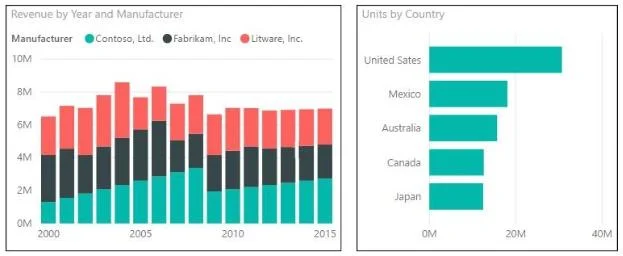
You are creating a report in Power BI Desktop that has two visualizations on a page as shown in the following exhibit. You need to ensure that when you click the bar of a country, only the values…
The correct answer is C. Click the Units by Country chart. On the Format tab, click Edit Interactions. On the Revenue by. https://docs.microsoft.com/en-us/power-bi/service-reports-visual-interactions
Model and Visualize Data by Using Power BI Desktop
Question
You are creating a report in Power BI Desktop that has two visualizations on a page as shown in the following exhibit. You need to ensure that when you click the bar of a country, only the values for that country are shown on the Revenue by Year and Manufacturer chart.
Exhibit
Options
- AClick the Revenue by Year and Manufacturer chart. On the Format tab, click Edit Interactions. On
- BClick the Revenue by Year and Manufacturer chart. On the Format tab, click Edit Interactions. On
- CClick the Units by Country chart. On the Format tab, click Edit Interactions. On the Revenue by
- DClick the Units by Country chart. On the Format tab, click Edit Interactions. On the Revenue by
How the community answered
(45 responses)- A7% (3)
- B11% (5)
- C80% (36)
- D2% (1)
Explanation
https://docs.microsoft.com/en-us/power-bi/service-reports-visual-interactions
Topics
#visual interactions#cross-filtering#Edit Interactions#report design
Community Discussion
No community discussion yet for this question.