
70-692 · Question #41
You update the video card driver on a computer that runs Windows 8.1. You can no longer configure the display settings to extend the display to a projector. You need to restore the display options…
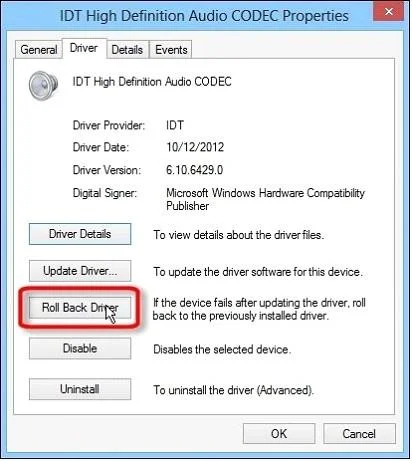
The correct answer is B. Roll back the video card driver to the previous version. Rolling back the driver is the simplest and fastest solution. C:\Users\Chaudhry\Desktop\1.jpg C:\Users\Chaudhry\Desktop\1.jpg Further Information: The DisplaySwitch /extend command might not work is the driver is broken. The sfc /scannow command checks system files for…
Question
You update the video card driver on a computer that runs Windows 8.1. You can no longer configure the display settings to extend the display to a projector. You need to restore the display options as quickly as possible and retain all user data. What should you do?
Exhibit
Options
- ARun the DisplaySwitch /extend command.
- BRoll back the video card driver to the previous version.
- CStart the computer from the Windows 8 installation media and perform a system image
- DRun the sfc /scannow command.
How the community answered
(35 responses)- A6% (2)
- B80% (28)
- C3% (1)
- D11% (4)
Explanation
Rolling back the driver is the simplest and fastest solution. C:\Users\Chaudhry\Desktop\1.jpg C:\Users\Chaudhry\Desktop\1.jpg Further Information: The DisplaySwitch /extend command might not work is the driver is broken. The sfc /scannow command checks system files for consistency. And a system image recovery will affect the user data.
Topics
Community Discussion
No community discussion yet for this question.