
70-667 · Question #158
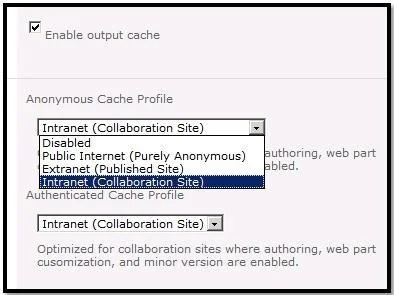
Select the appropriate process to configure Anonymous user output cache profile for internet usage
The correct answer is A. Go to Site Actions and click on Site Settings. Under Administration click Site Enable output cache. Configure page output cache settings at the site level 1. On the Site Actions menu , click Site Settings. 2. Under Site Administration, click Site output cache. 3. Under Anonymous Cache Profile, do one of the following: -To inherit the site-wide anonymous profile that you…
Question
Select the appropriate process to configure Anonymous user output cache profile for internet usage
Exhibit
Options
- AGo to Site Actions and click on Site Settings. Under Administration click Site Enable output cache.
- BUse PowerShell Cmdlet Install - SPUser - Identity Site Settings - Add AnonymousCacheProfile
- CFrom Central Administration click Site input cache and select Anonymous check box.
- DFrom Central Administration, create a new site collection, and then add an alternate access mapping
How the community answered
(49 responses)- A80% (39)
- B6% (3)
- C4% (2)
- D10% (5)
Explanation
Configure page output cache settings at the site level 1. On the Site Actions menu , click Site Settings. 2. Under Site Administration, click Site output cache. 3. Under Anonymous Cache Profile, do one of the following: -To inherit the site-wide anonymous profile that you configured on the Site Collection Output Cache Settings page, select Inherit the profile <profile name>. -To select a different anonymous cache profile for a page, click Select a page output cache profile. 4. Under Authenticated Cache Profile, do one of the following: -To inherit the site-wide authenticated profile that was configured on the Site Collection Output Cache Settings page, select Inherit the profile <profile name>. -To select a different authenticated cache profile for a page, select a page output cache profile. 5.To apply the settings to subsites in the site collection, select the Apply these settings to all sub- sites check box. configuringoutput-caching-HA101785628.aspx
Topics
Community Discussion
No community discussion yet for this question.