
Microsoft
70-667 · Question #159
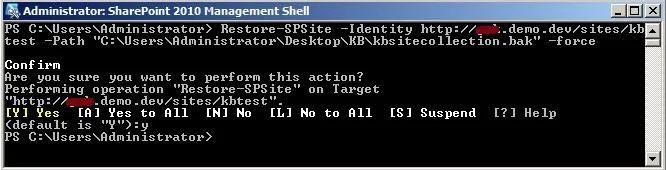
Steps to backup and restore a site collection using Powershell
The correct answer is A. Open Sharepoint 2010 Management Shell. sitecollection-with-powershell Go to All Programs Go to Microsoft SharePoint 2010 Products Open SharePoint 2010 Management Shell
Deploying SharePoint 2010
Question
Steps to backup and restore a site collection using Powershell
Exhibit
Options
- AOpen Sharepoint 2010 Management Shell.
- BOpen Sharepoint 2010 Management Shell. Then type the following command, Backup-SPFarm - Directory
- COpen Sharepoint 2010 Management Shell. Then type the following command, (Get- SPBackupHistory -
- DOpen Sharepoint 2010 Management Shell. Then type the following command, Backup-
How the community answered
(36 responses)- A81% (29)
- B6% (2)
- C3% (1)
- D11% (4)
Explanation
sitecollection-with-powershell Go to All Programs Go to Microsoft SharePoint 2010 Products Open SharePoint 2010 Management Shell
Topics
#PowerShell#Backup-SPFarm#backup restore#site collection
Community Discussion
No community discussion yet for this question.