
70-663 · Question #50
Your company has a main office and 10 branch offices. Each office has a direct link to the Internet. Each branch office connects to the main office. Your network consists of an Active Directory…
The correct answer is A. One Send connector for each site. Is it best practice to just have 1 send connector for the org and add all 3 of our servers in as source servers, or should we have 1 send connector for each site and just add the relevant exchange server in each site in as a source server. When entering the source servers in it…
Question
Your company has a main office and 10 branch offices. Each office has a direct link to the Internet. Each branch office connects to the main office. Your network consists of an Active Directory forest. Each office is configured as an Active Directory site. You plan to deploy an Exchange Server 2010 Hub Transport server in each site. You need to design a messages routing solution to meet the following requirements:
- Branch office connections to the Internet must be used to deliver e-
- Branch office servers must use the WAN link to the main office to
deliver e-mail to other branch offices
- Branch office servers must be prevented from sending e-mail to the
Internet by using the WAN link to the main office
- The solution must minimize administrative overhead
What should you include in the solution?
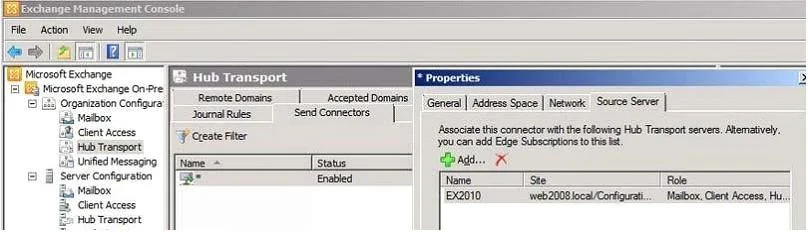
Exhibit
Options
- AOne Send connector for each site
- BOne SMTP site link for each site
- Ctwo Send connectors for each site
- D10 Send connectors for each site
How the community answered
(28 responses)- A86% (24)
- B7% (2)
- C4% (1)
- D4% (1)
Explanation
Is it best practice to just have 1 send connector for the org and add all 3 of our servers in as source servers, or should we have 1 send connector for each site and just add the relevant exchange server in each site in as a source server. When entering the source servers in it did mention a warning about the send connector having servers in different AD sites. Currently I have just 1 send connector configured with all 3 servers added as source servers and it seems to be working fine. Some organizations wish to deploy complete end to end redundancy for their Exchange environment, including the outgoing routes to the internet. To achieve this most organizations will simply provision a backup internet connection for their network. This connection can either be activated during an outage of their primary link, or be configured as a secondary route that will be automatically used if the primary route is down. Although this seems like a simple win it can cause problems with email delivery because of IP reputation issues. A common misconception is that outbound email can be load-balanced for Exchange simply by provisioning two equal cost Send Connectors. When the cost of the Send Connectors and the proximity to their source servers are the same, Exchange will simply choose the one with the alphanumerically lower connector name, and will not load balance the outgoing email across both The correct solution is to deploy a single Send Connector with multiple smart hosts. If the smart hosts are on your own network then they are configured to route to the internet via their respective ISP connection. Or if the smart hosts are actually hosted by the ISP then the Send Connector simply specifies the IP addresses or DNS names of the smart hosts, and the Exchange source servers would need static routes configured to be able to reach each smart host over the correct ISP connection.
Topics
Community Discussion
No community discussion yet for this question.