
70-663 · Question #188
A corporate environment includes an on-premise deployment of Exchange Server 2010 SP1. The environment is configured as shown in the following table. The company plans to move the European employee…
The correct answer is B. Configure an external relay domain for tailspintoys.com. Internal Relay - This is used when you share contacts across different mail systems. When this type of accepted domain is configured Exchange Server will receive the mail if there is no mailbox for that address in the Exchange Organisation it will forward it to another server…
Question
A corporate environment includes an on-premise deployment of Exchange Server 2010 SP1. The environment is configured as shown in the following table. The company plans to move the European employee email accounts to a cloud-based Exchange Server 2010 SP1 service provider. You have the following requirements:
- Route incoming messages to the appropriate Exchange Server
environment.
- Ensure that all employees retain their current email addresses.
- Ensure that MX records do not change.
You need to recommend a solution for meeting the requirements. What should you recommend?
Exhibit
Options
- AConfigure address rewriting.
- BConfigure an external relay domain for tailspintoys.com.
- CConfigure address rewriting.
- DConfigure an external relay domain for wingtiptoys.com.
How the community answered
(45 responses)- A11% (5)
- B80% (36)
- C2% (1)
- D7% (3)
Explanation
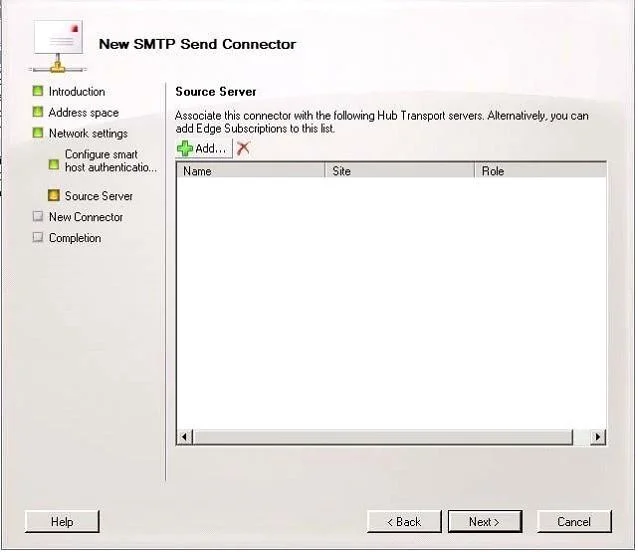
Internal Relay - This is used when you share contacts across different mail systems. When this type of accepted domain is configured Exchange Server will receive the mail if there is no mailbox for that address in the Exchange Organisation it will forward it to another server for delivery. This is often refered to as a Shared SMTP Namespace External Relay - This is used when the Exchange Organisation is responsible for receiving the email but then simply forwards the mail on to another system. In this scenario there would be no mailboxes within the Exchange Organisation for this domain Once you have created an Internal or External Relay domain you need to configure a Send Connector so that Exchange knows where to route the emails for this domain. On the Source Server screen you click the Add button and select from the list a server in your organisation that has the Hub Transport role or select an Edge Subscription. So the difference is realy whether email reaches the Mailbox server or it's just forwards immediately to another organization. Since all European employees will be moved to the cloud, there is no need to have Shared address space configuration in Amera. Just create an external Relay domain. External Relay Domains External Relay domain involves external message routing. For example, take the scenario where the MX records for fabrikam.com are configured to point to the Edge Transport servers within the neilhobson.com Exchange organization. If these Edge Transport servers are configured with an external relay domain for fabrikam.com, messages destined for the fabrikam.com SMTP namespace are accepted by the Edge Transport servers in the neilhobson.com Exchange organization, but are then immediately relayed via a Send connector configured on the Edge Transport servers to the Edge Transport servers responsible for the fabrikam.com Exchange organization. In other words, the message routing happens externally at the Edge Transport server level rather than at the Hub Transport server level as we saw with internal relay domains. Internal Relay Domain. In case of a shared address space you need Internal Relay domain. The accepted domain that's configured as an internal relay domain first tries to deliver to a recipient in the Exchange organization. If the recipient isn't found, the message is routed to the Send connector that has the closest address space match. If an organization contains more than one forest and has configured global address list (GAL) synchronization, the SMTP domain for one forest may be configured as an internal relay domain in a second forest. Messages from the Internet that are addressed to recipients in internal relay domains are relayed to the Mailbox servers in the same organization. The receiving Mailbox servers then route the messages to the Mailbox servers in the recipient forest. You configure the SMTP domain as an internal relay domain to make sure that email that's addressed to that domain is accepted by the Exchange organization. The connector configuration of your organization determines how messages are routed. To support routing messages for a shared address space, you must create an accepted domain that's configured as an internal relay domain. When you configure an accepted domain as an internal relay domain, Exchange first tries to deliver to a recipient in the Exchange organization. If the recipient isn't found, the message is routed to the Send connector that has the closest address space match.
Topics
Community Discussion
No community discussion yet for this question.