
70-663 · Question #178
A corporate environment includes Exchange Server 2010. The Exchange Server environment includes two Hub Transport servers, two Client Access servers, and two Mailbox servers on the internal network…
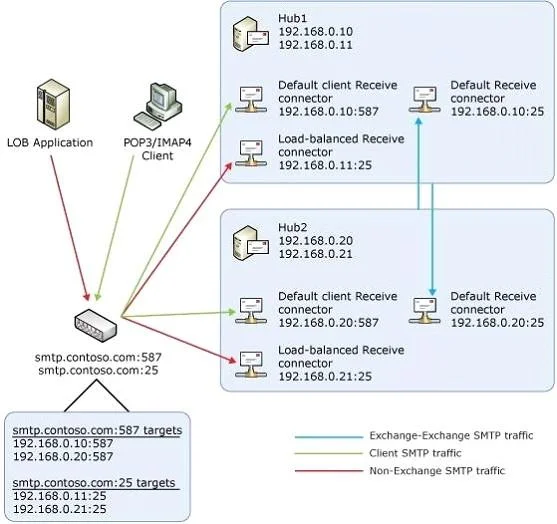
The correct answer is D. Deploy a hardware load balancer for SMTP connections to the Hub Transport servers. You can configure a hardware load balancing solution to distribute non-Exchange messages among your Hub Transport or Edge Transport servers [load balancing solution to handle message traffic between the Exchange servers in your organization isn't supported]. If you plan on…
Question
A corporate environment includes Exchange Server 2010. The Exchange Server environment includes two Hub Transport servers, two Client Access servers, and two Mailbox servers on the internal network and two stand-alone Edge Transport servers in the perimeter network. The Mailbox servers are in a database availability group (DAG). You are designing a solution to allow a third-party application to send email messages to both internal users and external users. You have the following requirements:
- Ensure that the third-party application can use domain-based NTLM
authentication method for outgoing messages.
- Ensure that if only one server has a hardware failure, all outgoing
messages are accepted for delivery.
- Minimize the cost of the solution.
You need to recommend a solution that meets the requirements. What should you recommend?
Exhibit
Options
- AConfigure DNS round-robin rotation for SMTP connections to the Mailbox servers
- BDeploy a hardware load balancer for SMTP connections to the Edge Transport servers
- CConfigure DNS round-robin rotation for SMTP connections to the Edge Transport servers
- DDeploy a hardware load balancer for SMTP connections to the Hub Transport servers
How the community answered
(20 responses)- A5% (1)
- B10% (2)
- C5% (1)
- D80% (16)
Explanation
You can configure a hardware load balancing solution to distribute non-Exchange messages among your Hub Transport or Edge Transport servers [load balancing solution to handle message traffic between the Exchange servers in your organization isn't supported]. If you plan on placing a load balancing solution in front of your Hub Transport servers, you should create a separate Receive connector for that purpose and make sure that only traffic processed by that particular connector is subject to load balancing. This can be achieved by adding an additional IP address to the Hub Transport server and associating this IP address with the new Receive connector. In addition, the Exchange Server authentication option should be disabled on the Receive connector to ensure Exchange traffic doesn't route over it. The following figure shows a configuration where a load balancer is used to distribute messages received from POP3 or IMAP4 clients and non- Exchange SMTP servers among two Hub Transport servers.
Topics
Community Discussion
No community discussion yet for this question.