
70-663 · Question #11
You have an Exchange Server 2003 organization. All e-mail messages sent to the organization from the Internet are delivered to an Exchange Server 2003 server. You plan to transition the delivery of…
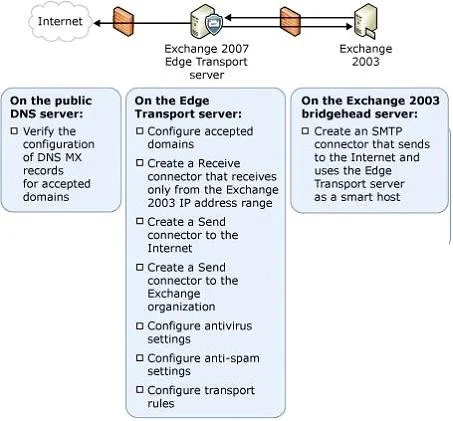
The correct answer is A. accepted domains. An accepted domain is the SMTP namespace for which Exchange 2010 is allowed to receive By creating an accepted domain within the Exchange 2010 configuration, we are telling the Exchange 2010 environment that it is allowed to receive SMTP messages destined for users with that…
Question
You have an Exchange Server 2003 organization. All e-mail messages sent to the organization from the Internet are delivered to an Exchange Server 2003 server. You plan to transition the delivery of e-mail from the Internet to an Exchange Server 2010 Hub Transport server. You need to create a transition plan for e-mail delivery from the Internet. What should you plan to modify?
Exhibit
Options
- Aaccepted domains
- Baddress lists
- Ce-mail address policies
- DRecover connectors
How the community answered
(41 responses)- A76% (31)
- B12% (5)
- C5% (2)
- D7% (3)
Explanation
An accepted domain is the SMTP namespace for which Exchange 2010 is allowed to receive By creating an accepted domain within the Exchange 2010 configuration, we are telling the Exchange 2010 environment that it is allowed to receive SMTP messages destined for users with that domain name in their email addresses. Configured through Hub Transport and Edge Transport: Internal Send Connector to Exchange 2003: On the Address space page, click Add. Several SMTP domains can be added as separate entries, or, in the Add Address Space dialog box, the -- placeholder can be entered (Figure 9). The -- placeholder represents all authoritative and internal relay domains configured as Accepted On the Network settings page (Figure 10), select Route mail through the following smart hosts, and then click Add. In the Add smart host dialog box, enter the IP Address or the FQDN of the Exchange 2003 bridgehead server that will receive the incoming messages.
Topics
Community Discussion
No community discussion yet for this question.