500-220 · Question #60
Drag and Drop Question Drag and drop the steps from the left into the sequence on the right to manage device control, according to Cisco Meraki best practice. Answer:
The correct answer is enroll; define tags; create profile; add settings profile; apply profile. Cisco Meraki Device Control - Workflow Explanation The correct sequence reflects Meraki Systems Manager (MDM) best practices, where each step depends on the one before it being complete. --- The Sequence and Why 1. Enroll The device must first be enrolled into Meraki Systems…
Question
Drag and Drop Question Drag and drop the steps from the left into the sequence on the right to manage device control, according to Cisco Meraki best practice. Answer:
Exhibit
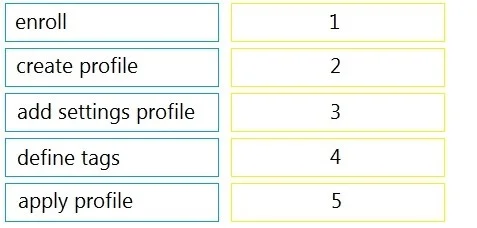
Answer Area
Drag items
Correct arrangement
- enroll
- define tags
- create profile
- add settings profile
- apply profile
Explanation
Cisco Meraki Device Control - Workflow Explanation
The correct sequence reflects Meraki Systems Manager (MDM) best practices, where each step depends on the one before it being complete.
The Sequence and Why
1. Enroll The device must first be enrolled into Meraki Systems Manager before anything else is possible. An unenrolled device is invisible to the platform - you cannot tag, profile, or manage it. This is always the entry point.
2. Define Tags Tags are labels assigned to enrolled devices to group them logically (e.g., by role, department, or OS). You define tags before creating profiles because profiles are scoped and deployed using tags. If you create a profile first, you have no targeting mechanism ready.
3. Create Profile A profile is the container that will hold configuration settings. You create the profile shell before adding settings to it - you need the object to exist before you can populate it.
4. Add Settings Profile This step populates the profile with actual configuration payloads: Wi-Fi credentials, VPN settings, restrictions, passcode policies, etc. It must come after creating the profile, since there is no container to add settings to otherwise.
5. Apply Profile Once the profile is fully configured, you apply it to devices - typically by associating it with the tags defined in step 2. This pushes the settings to all matching enrolled devices.
Common Mistakes
| Mistake | Why It's Wrong |
|---|---|
| Defining tags before enrolling | Tags can't be assigned without a device in the system |
| Adding settings before creating a profile | No container exists to hold them |
| Applying the profile before adding settings | You'd push an empty/incomplete profile to devices |
| Skipping tags and applying directly | Profiles need tag-based targeting; skipping tags makes scoped deployment impossible |
Mental model: Think of it as "get the device → categorize it → build the policy → fill the policy → deliver the policy." Each step gates the next.
Topics
Community Discussion
No community discussion yet for this question.
