500-220 · Question #59
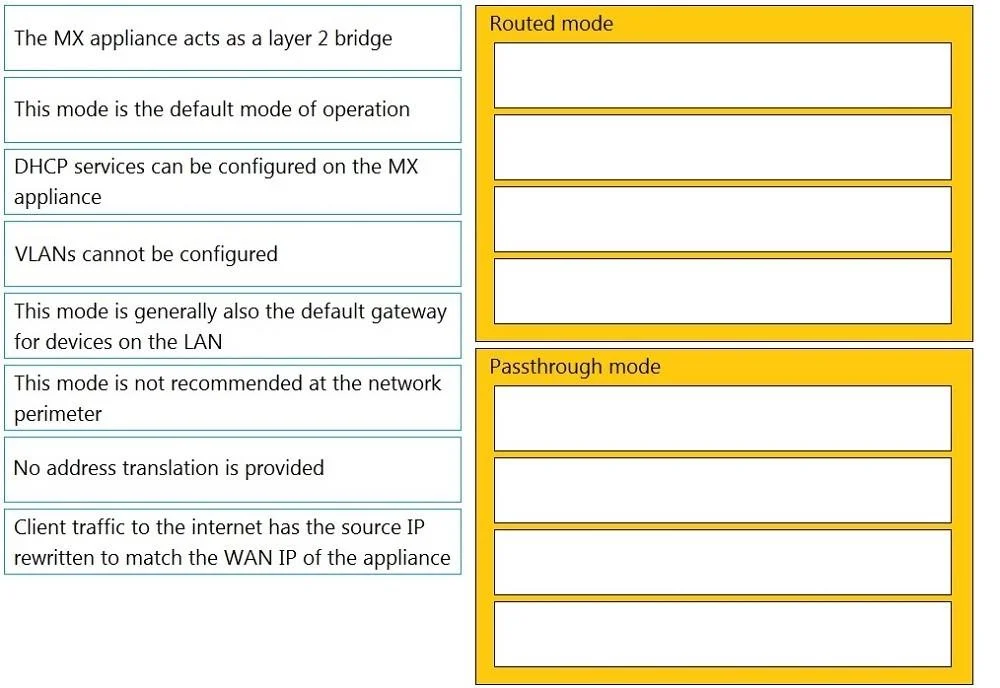
Drag and Drop Question Drag and drop the descriptions from the left onto the corresponding MX operation mode on the right. Answer:
The correct answer is This mode is the default mode of operation; DHCP services can be configured on the MX appliance; This mode is generally also the default gateway for devices on the LAN; Client traffic to the internet has the source IP rewritten to match the WAN IP of the appliance; The MX appliance acts as a layer 2 bridge; VLANs cannot be configured; This mode is not recommended at the network perimeter; No address translation is provided. MX Operation Modes: Drag-and-Drop Explained The 8 items split evenly between the two MX operation modes: Routed Mode (items 1–4) and Passthrough/Bridge Mode (items 5–8). --- Routed Mode (Items 1–4) 1. "This mode is the default mode of operation" Routed mode ships as the factory…
Question
Exhibit
Answer Area
Drag items
Correct arrangement
- This mode is the default mode of operation
- DHCP services can be configured on the MX appliance
- This mode is generally also the default gateway for devices on the LAN
- Client traffic to the internet has the source IP rewritten to match the WAN IP of the appliance
- The MX appliance acts as a layer 2 bridge
- VLANs cannot be configured
- This mode is not recommended at the network perimeter
- No address translation is provided
Explanation
MX Operation Modes: Drag-and-Drop Explained
The 8 items split evenly between the two MX operation modes: Routed Mode (items 1–4) and Passthrough/Bridge Mode (items 5–8).
Routed Mode (Items 1–4)
1. "This mode is the default mode of operation" Routed mode ships as the factory default. The MX operates as a Layer 3 router between WAN and LAN. Common mistake: assuming passthrough is default because it sounds simpler.
2. "DHCP services can be configured on the MX appliance" In routed mode, the MX terminates subnets and can serve DHCP directly to LAN clients. In passthrough mode, the MX is transparent - it doesn't own any LAN subnet, so it cannot serve DHCP.
3. "This mode is generally also the default gateway for devices on the LAN" Because the MX owns the LAN-side IP in routed mode, clients point their default gateway at the MX. This is a direct consequence of L3 routing - the MX is the next hop out of the LAN.
4. "Client traffic to the internet has the source IP rewritten to match the WAN IP of the appliance" This describes NAT (specifically PAT/masquerade). Routed mode performs NAT by default, hiding internal RFC 1918 addresses behind the public WAN IP.
Passthrough / Bridge Mode (Items 5–8)
5. "The MX appliance acts as a layer 2 bridge" This is the defining characteristic of passthrough mode - the MX is inserted inline but forwards frames at L2, making it transparent to the rest of the network.
6. "VLANs cannot be configured" Because the MX is a transparent bridge and doesn't terminate L3 subnets, there's no concept of MX-managed VLANs. VLAN configuration belongs to the upstream router/switch. Common mistake: thinking you can still use MX VLAN features in this mode.
7. "This mode is not recommended at the network perimeter" Without NAT, the MX exposes internal IPs directly to the internet and loses some stateful firewall enforcement. Cisco/Meraki explicitly recommends against using passthrough mode at the internet edge.
8. "No address translation is provided" The corollary to being L2: the MX passes traffic without modifying IP headers, so NAT never occurs. Internal addresses are visible end-to-end. This is what makes it unsuitable at the perimeter (item 7).
Key Takeaways
| Mode | Owns LAN IP | DHCP | NAT | VLANs | Default |
|---|---|---|---|---|---|
| Routed | Yes | Yes | Yes | Yes | Yes |
| Passthrough | No | No | No | No | No |
Most common misconception: Thinking passthrough mode still provides some NAT or firewall protection. It does not - it is fully transparent at Layer 2 with no address translation.
Topics
Community Discussion
No community discussion yet for this question.