nerdexam
Cisco

500-220 · Question #74

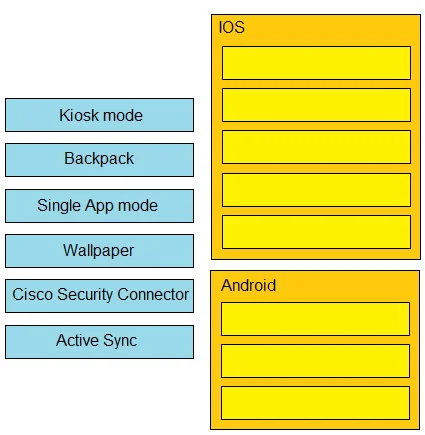
Drag and Drop Question Drag and drop the settings from the left onto the OS system or systems that support it on the right. Settings can be used more than once. Answer:

The correct answer is Backpack; Single App mode; Wallpaper; Cisco Security Connector; Active Sync; Kiosk mode; Backpack; Active Sync. MDM Settings by Mobile OS: Drag-and-Drop Explained This question tests knowledge of Mobile Device Management (MDM) settings and which mobile operating systems support them. The two target OS columns are iOS (Apple) and Android. --- The Correct Mapping | # | Setting | OS |…

Cisco Meraki Management and Operations

Question

Drag and Drop Question Drag and drop the settings from the left onto the OS system or systems that support it on the right. Settings can be used more than once. Answer:

Exhibit
500-220 question #74 exhibit

Answer Area

Drag items

Kiosk modeBackpackSingle App modeWallpaperCisco Security ConnectorActive Sync

Correct arrangement

  • Backpack
  • Single App mode
  • Wallpaper
  • Cisco Security Connector
  • Active Sync
  • Kiosk mode
  • Backpack
  • Active Sync

Explanation

MDM Settings by Mobile OS: Drag-and-Drop Explained

This question tests knowledge of Mobile Device Management (MDM) settings and which mobile operating systems support them. The two target OS columns are iOS (Apple) and Android.


The Correct Mapping

#SettingOS
1BackpackiOS
2Single App modeiOS
3WallpaperiOS
4Cisco Security ConnectoriOS
5Active SynciOS
6Kiosk modeAndroid
7BackpackAndroid
8Active SyncAndroid

Item-by-Item Breakdown

Single App Mode → iOS only An Apple MDM feature for supervised iOS devices that locks the device to one specific application. This is the Apple-defined term. Common exam trap: Android's equivalent is called "Kiosk mode," not Single App Mode.

Kiosk Mode → Android only Android Enterprise's Corporate Owned Single Use (COSU) deployment locks the device to one or a limited set of apps. The specific term "Kiosk mode" belongs to Android in MDM contexts, not iOS.

Cisco Security Connector → iOS only A Cisco enterprise security app that provides DNS-layer protection, network visibility, and threat defense - but only built and supported for supervised iOS devices. There is no Android equivalent. This is a hard iOS exclusive.

Active Sync → Both iOS and Android Microsoft Exchange ActiveSync is a protocol for syncing email, contacts, and calendar data. Both platforms support it natively, hence it appears twice (positions 5 and 8).

Backpack → Both iOS and Android A containerization/content management feature supported by certain MDM platforms on both platforms, hence it appears twice (positions 1 and 7). It creates a managed "container" separating corporate data from personal data.

Wallpaper → iOS only (in this context) While Android MDM technically supports wallpaper enforcement too, this question places it under iOS - reflecting that supervised iOS MDM profiles have robust, well-defined wallpaper enforcement as a specific configuration payload. The question may be scoping to Apple Configurator/supervised device capabilities.


Common Mistakes

  • Confusing Single App Mode with Kiosk Mode - they do the same thing but the terms are OS-specific. Single App = iOS; Kiosk = Android.
  • Assuming Cisco Security Connector is cross-platform - it is iOS-only.
  • Forgetting Active Sync is cross-platform - it's a protocol, not an OS feature, so both platforms support it.
  • Placing Kiosk mode under iOS - iOS uses the term "Guided Access" for end-user use and "Single App Mode" for MDM-enforced lockdown.

Topics

#Systems Manager#OS support#MDM#platform compatibility

Community Discussion

No community discussion yet for this question.

Full 500-220 Practice