
500-220 · Question #73
Drag and Drop Question Drag and drop the settings from the left onto the available or non-available methods of applying a group policy to a Cisco Meraki MR access point on the right. Answer:
The correct answer is By Sentry Policy; By Radius Attribute; By Device Type; By Client; By VLAN; By Active Directory Group. Cisco Meraki MR Access Point - Group Policy Application Methods The Core Concept The drag-and-drop has two target columns: Available methods and Non-Available methods for applying group policies on a Meraki MR (wireless) access point. The split is: | Available (1–4) |…
Question
Drag and Drop Question Drag and drop the settings from the left onto the available or non-available methods of applying a group policy to a Cisco Meraki MR access point on the right. Answer:
Exhibit
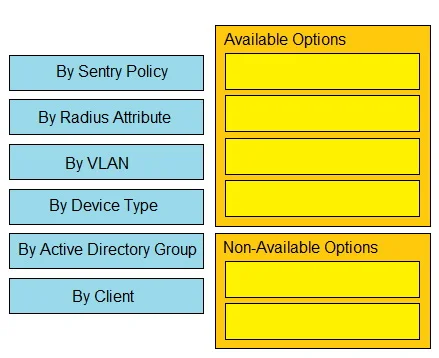
Answer Area
Drag items
Correct arrangement
- By Sentry Policy
- By Radius Attribute
- By Device Type
- By Client
- By VLAN
- By Active Directory Group
Explanation
Cisco Meraki MR Access Point - Group Policy Application Methods
The Core Concept
The drag-and-drop has two target columns: Available methods and Non-Available methods for applying group policies on a Meraki MR (wireless) access point.
The split is:
| Available (1–4) | Non-Available (5–6) |
|---|---|
| By Sentry Policy | By VLAN |
| By RADIUS Attribute | By Active Directory Group |
| By Device Type | |
| By Client |
Why Each Item Is Placed Here
AVAILABLE Methods
1. By Sentry Policy Meraki Systems Manager (MDM) integrates directly with MR APs via Sentry. When a device enrolls or its compliance state changes, the AP dynamically applies the matching group policy. This is a native Meraki wireless feature.
2. By RADIUS Attribute
During 802.1X/WPA-Enterprise authentication, a RADIUS server can return a Meraki VSA (Vendor-Specific Attribute) or Filter-Id attribute naming a group policy. The AP applies it immediately upon authentication. Fully supported on MR.
3. By Device Type Meraki APs perform passive device fingerprinting (user-agent, DHCP options, etc.) to classify clients as iOS, Android, Windows, etc. A matching group policy can be applied automatically. Built into the MR platform.
4. By Client Administrators can manually assign a group policy to a specific client MAC address in the dashboard. This is the most direct, always-supported method on any Meraki device.
NON-AVAILABLE Methods
5. By VLAN VLAN-based group policy assignment is a feature of the MS (switching) platform. On MR APs, VLANs are configured per SSID, not used as a trigger to assign group policies. Applying a policy "by VLAN" is not a supported method in the MR group policy framework.
6. By Active Directory Group While Meraki supports AD integration for splash page authentication, assigning group policies based on AD group membership is not a supported method on MR APs. AD-group-based policy assignment exists on the MS platform or via workarounds (e.g., RADIUS returning the policy name), but not as a direct first-class MR group policy method.
Common Mistakes & Misconceptions
- VLAN confusion: Candidates often assume VLAN tagging = policy assignment. On MR, VLANs segment traffic per SSID; they don't trigger group policies.
- AD overestimation: AD integration sounds powerful, so candidates assume it covers group policy assignment on MR. It doesn't - the MR AD integration scope is limited to captive portal/splash authentication.
- Conflating MS and MR features: Several of the non-available methods work on Meraki switches (MS) but not on wireless APs (MR). Always anchor your answer to the specific platform the question names.
Topics
Community Discussion
No community discussion yet for this question.