
350-401 · Question #996
Lab Simulation 9 Guidelines This is a lab item in which tasks will be performed on virtual devices. - Refer to the Tasks tab to view the tasks for this lab item. - Refer to the Topology tab to…
OSPF Lab Simulation - Detailed Explanation --- Overall Goal This lab configures OSPF using interface-level commands instead of the traditional network statement. It also optimizes OSPF behavior on Ethernet links by eliminating unnecessary DR/BDR elections and suppressing extra…
Question
Exhibits
Explanation
OSPF Lab Simulation - Detailed Explanation
Overall Goal
This lab configures OSPF using interface-level commands instead of the traditional network statement. It also optimizes OSPF behavior on Ethernet links by eliminating unnecessary DR/BDR elections and suppressing extra /32 host routes from loopbacks.
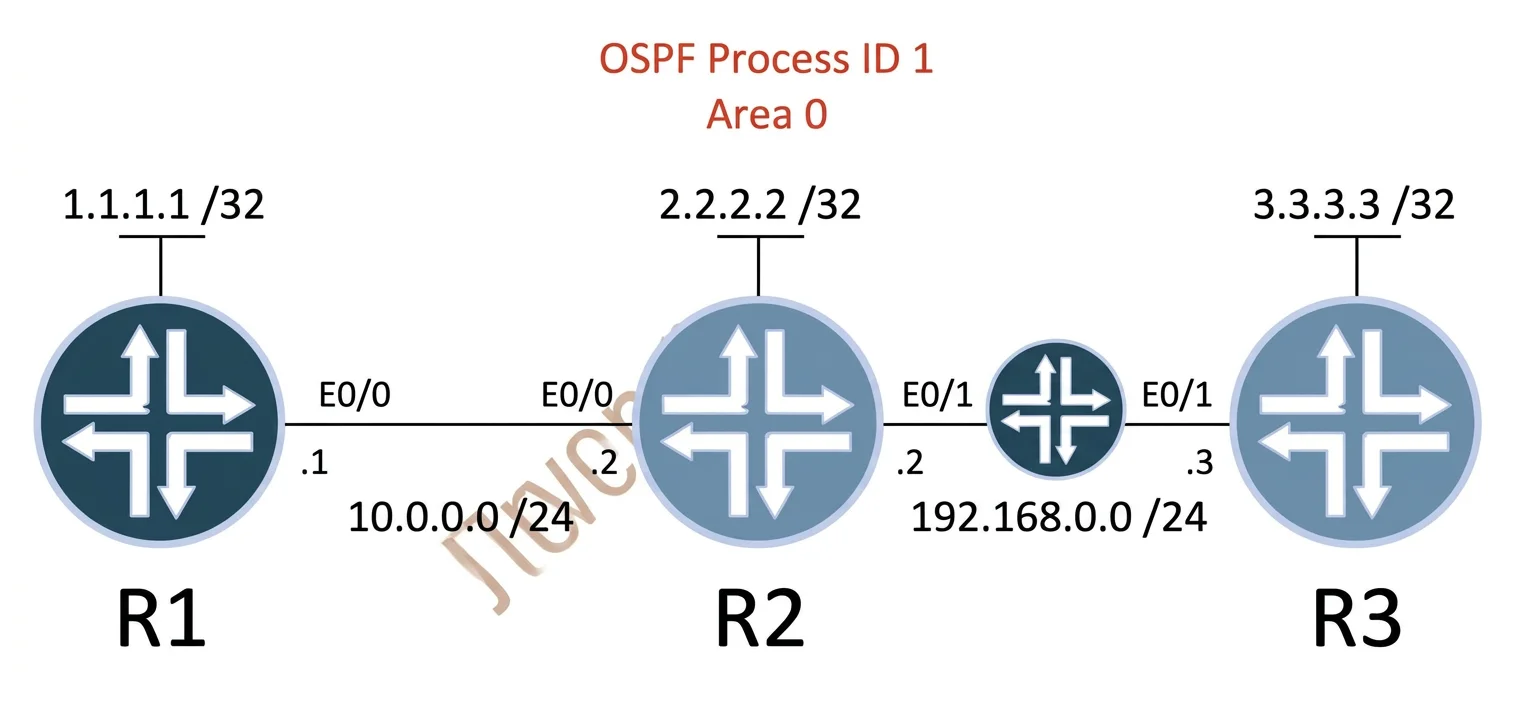
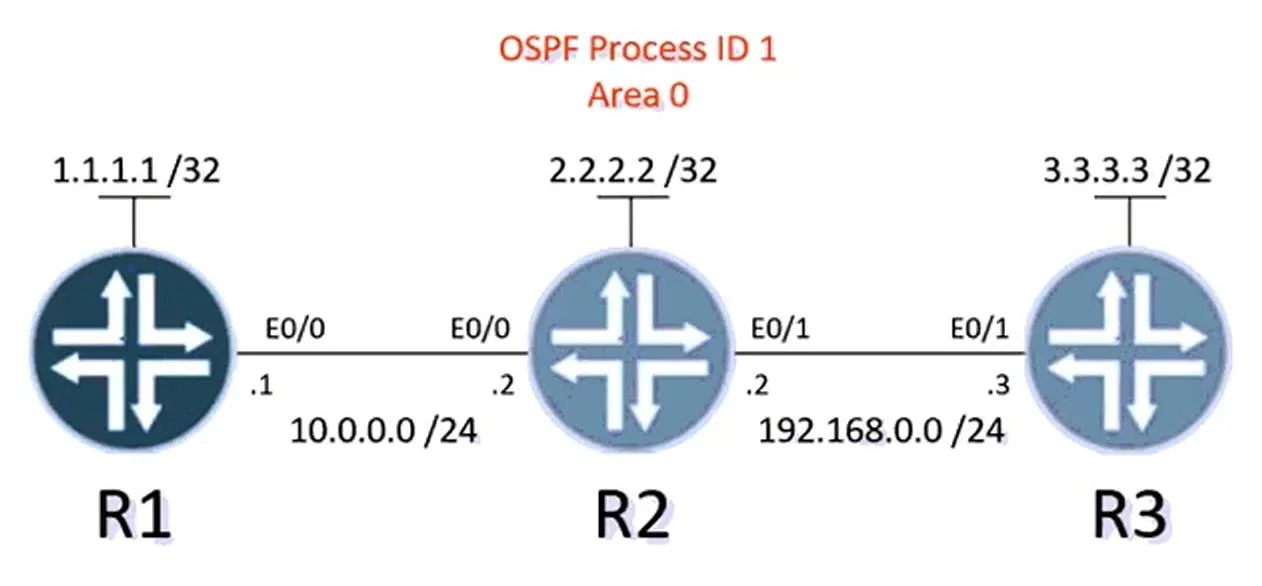
The topology is a chain: R1 - (e0/0)/(e0/0) - R2 - (e0/1)/(e0/1) - R3, each router also having a loopback (lo0).
Why This Approach Is Correct
Traditional OSPF uses network x.x.x.x wildcard area X under router ospf. The modern alternative is to enable OSPF directly on the interface with ip ospf <process-id> area <area>. This is cleaner, more explicit, and avoids wildcard mask errors.
Step-by-Step Reasoning
Steps 1-3: Enable OSPF on each interface with ip ospf 1 area 0
This replaces the network statement entirely. Each interface is individually told to participate in OSPF process 1, area 0. The router automatically advertises that interface's subnet into OSPF.
- R1's e0/0 connects to R2 -> both must have OSPF enabled on that link to form adjacency
- R2's e0/1 connects to R3 -> same reason
- All lo0 interfaces must be included so loopback networks are advertised
If skipped: An interface without ip ospf 1 area 0 won't advertise its subnet and won't form neighbors across that link - other routers will have no route to that network.
Step 4: show ip ospf neighbor
Verifies that neighbor adjacencies reached FULL state. If you see neighbors stuck in INIT or 2WAY, there's a mismatch (area, process ID, hello/dead timers, or authentication).
If skipped: You might proceed assuming OSPF works, only to find routes missing later with no clear cause.
Step 5: show ip route ospf
Confirms all subnets (Ethernet links + loopbacks) appear in the routing table as OSPF routes (marked O). This validates Task 2 - all networks are being exchanged.
If skipped: You can't confirm Task 2 is satisfied and may submit an incomplete configuration.
Steps 6-7: ip ospf network point-to-point on each Ethernet interface
This single command solves two problems simultaneously:
| Problem | Default Behavior | Point-to-Point Fix |
|---|---|---|
| DR/BDR election | Ethernet = broadcast type -> triggers DR/BDR election | P2P type -> no election, no DR/BDR overhead |
| Loopback host routes | Loopbacks advertised as /32 by default | P2P changes how OSPF reports connected subnets, advertising the actual subnet mask |
The question asks for a single command that does both - ip ospf network point-to-point is that command.
If skipped: DR/BDR elections still happen (wasted overhead, slower convergence on failures), and loopback interfaces advertise as /32 host routes rather than their configured subnet mask, which can confuse routing.
If applied to loopbacks instead of Ethernet: Loopbacks are already point-to-point by nature. The command belongs on the Ethernet interfaces where the broadcast network type is the default.
Step 8: copy running-config startup-config
Saves config to NVRAM. Without this, a reload wipes everything. The lab explicitly requires this before clicking Next.
If skipped: Your configuration is lost and the lab scores zero.
Order Dependency
Steps 6-7 can technically be done before or after steps 1-3, but logically you should enable OSPF first, verify adjacencies, then tune network type. If you set point-to-point before enabling OSPF on an interface, it's harmless but you can't verify its effect until OSPF is running.
Memory Tip
"Interface IN, Point-to-Point OUT"
- Put OSPF IN at the interface level:
ip ospf 1 area 0- Take DR/BDR and /32 routes OUT:
ip ospf network point-to-point- Always save OUT before you leave:
copy run start
The key insight: on a two-router link, there's no need for a DR/BDR (those exist to reduce adjacency overhead on multi-access networks with many routers). Point-to-point is always the right choice for a link with exactly two endpoints.
Topics
Community Discussion
No community discussion yet for this question.