
350-401 · Question #780
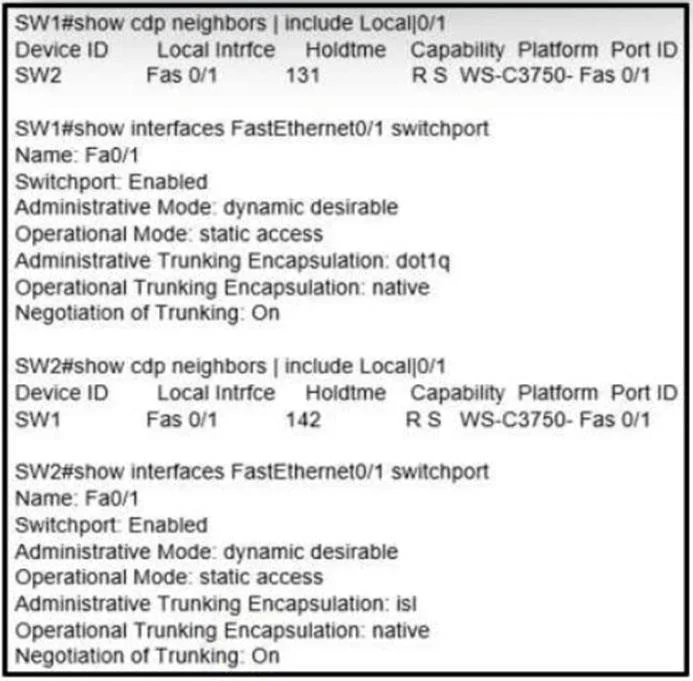
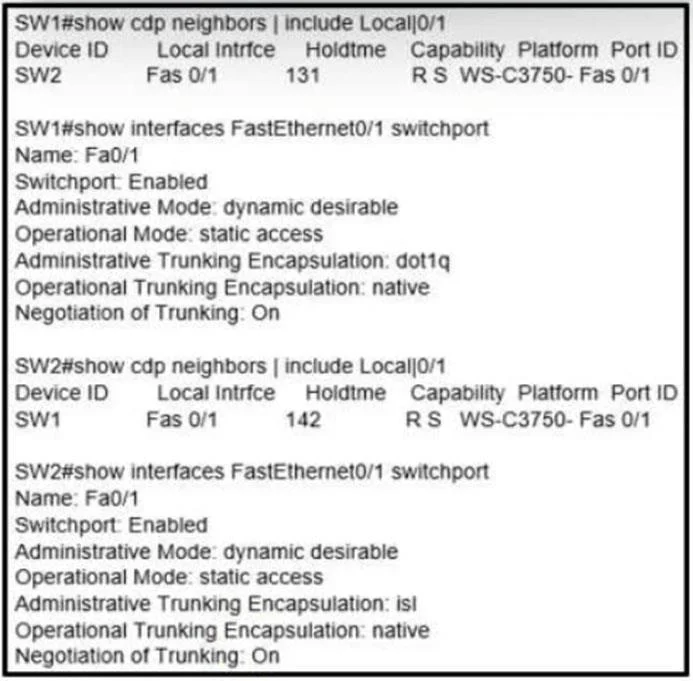
Refer to the exhibit. An engineer configures a trunk between SW1 and SW2 but tagged packets are not passing. Which action fixes the issue?
The correct answer is C. Configure SW2 with encapsulation dot1q on interface FastEthernet0/1. If tagged packets are not passing on a switch link intended for trunking, explicitly configuring 802.1Q encapsulation ensures that the correct tagging mechanism is enabled.
Question
Exhibits
Options
- AConfigure SW1 with dynamic auto mode on interface FastEthernet0/1.
- BConfigure the native VLAN to be the same VLAN on both switches on interface FastEthernet0/1.
- CConfigure SW2 with encapsulation dot1q on interface FastEthernet0/1.
- DConfigure FastEthernet0/1 on both switches for static trunking.
How the community answered
(69 responses)- A3% (2)
- B12% (8)
- C80% (55)
- D6% (4)
Why each option
If tagged packets are not passing on a switch link intended for trunking, explicitly configuring 802.1Q encapsulation ensures that the correct tagging mechanism is enabled.
Configuring `dynamic auto` mode on SW1 only makes the interface willing to form a trunk if the peer initiates it; if SW2 is also in `dynamic auto` or `access` mode, a trunk will not form, and tagged packets will not pass.
To ensure tagged packets pass, the interface must be configured with the correct trunk encapsulation type, and `encapsulation dot1q` explicitly enables the 802.1Q tagging standard for the trunk.
Concept tested: Trunking encapsulation configuration (802.1Q)
Source: https://www.cisco.com/c/en/us/td/docs/switches/lan/catalyst3750/software/release/12-2_55_se/configuration/guide/scg/swtrunks.html
Topics
Community Discussion
No community discussion yet for this question.