
350-401 · Question #528
Drag and Drop Question A network engineer is adding an additional 10Gps link to an exiting 2x10Gps LACP-based LAG to augment its capacity. Network standards require a bundle interface to be taken…
The correct answer is Execute the channel-group number mode active command to add the 10Gbps link to the existing bundle.; Execute the lacp min-bundle 3 command to set the minimum number of ports threshold.; Validate the network layer of the 10Gbps link.; Validate the physical and data link layers of the 10Gbps link. LACP LAG Expansion - Exam Question Explained Background Context The engineer is expanding an existing LACP-based LAG (Link Aggregation Group) from 2x10Gbps to 3x10Gbps. Two constraints drive the solution: The bundle must go out of service if any member link fails (min-bundle…
Question
Exhibit
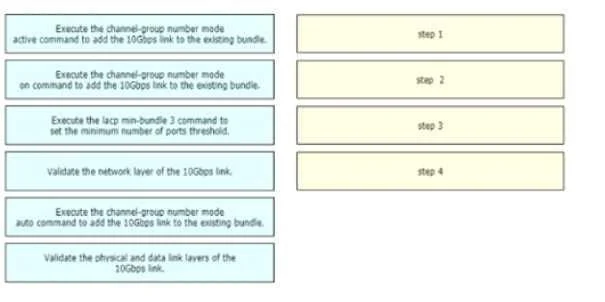
Answer Area
Drag items
Correct arrangement
- Execute the channel-group number mode active command to add the 10Gbps link to the existing bundle.
- Execute the lacp min-bundle 3 command to set the minimum number of ports threshold.
- Validate the network layer of the 10Gbps link.
- Validate the physical and data link layers of the 10Gbps link.
Explanation
LACP LAG Expansion - Exam Question Explained
Background Context
The engineer is expanding an existing LACP-based LAG (Link Aggregation Group) from 2x10Gbps to 3x10Gbps. Two constraints drive the solution:
- The bundle must go out of service if any member link fails (
min-bundlerequirement) - Changes must have minimal impact to the live network
Step-by-Step Placement Rationale
Step 1: channel-group number mode active
mode active is the correct LACP mode - it actively sends LACPDUs to negotiate link aggregation. The existing bundle already uses LACP, so the new member must use LACP as well. All members in a bundle must use the same protocol.
Why not
mode on? This creates a static LAG with no LACP negotiation. You cannot mixmode onwith LACP ports in the same bundle - it will cause the link to be suspended.Why not
mode auto?autois PAgP (Cisco proprietary). The question explicitly states the LAG is LACP-based - mixing protocols is not possible.
Step 2: lacp min-bundle 3
This command sets the minimum number of active member links required for the bundle to remain in service. With min-bundle 3, if any one of the three links fails, the bundle is administratively taken down - satisfying the network standard.
Critical ordering reason: This command must come after adding the new link (Step 1). If you set min-bundle 3 while only 2 links are active, the bundle immediately goes out of service because it falls below the threshold. You'd disrupt a live production bundle unnecessarily.
Step 3: Validate the network layer
After configuration, you verify Layer 3 (IP connectivity, routing) across the bundle. This confirms the bundle is carrying traffic correctly and the network-level impact was minimal. This is a top-down confirmation: "Is the bundle still serving traffic?"
Step 4: Validate the physical and data link layers
After confirming the network layer is healthy, you drill down to verify the new link's Layer 1/2 status - confirming LACP negotiation succeeded, the link is in the correct LACP state (bundled), and the physical interface is error-free.
Common misconception: Students expect L1/L2 validation before L3, following the OSI model bottom-up. Here the order is top-down post-configuration verification: first confirm the live network is unaffected (L3), then verify the new member link's participation at lower layers. This is also a valid troubleshooting methodology - confirm the outcome, then confirm the mechanism.
Summary Table
| Step | Action | Why Here |
|---|---|---|
| 1 | mode active | LACP-compatible mode; must match existing bundle protocol |
| 2 | lacp min-bundle 3 | Must wait until 3rd link is in bundle or it kills the existing 2-link bundle |
| 3 | Validate network layer | Confirm live traffic is unaffected (minimal-impact check) |
| 4 | Validate physical/data link | Confirm the new member link is properly negotiated in the bundle |
Not used: mode on (static, no LACP) and mode auto (PAgP, wrong protocol) - both are incompatible with an LACP bundle.
Topics
Community Discussion
No community discussion yet for this question.