
350-401 · Question #329
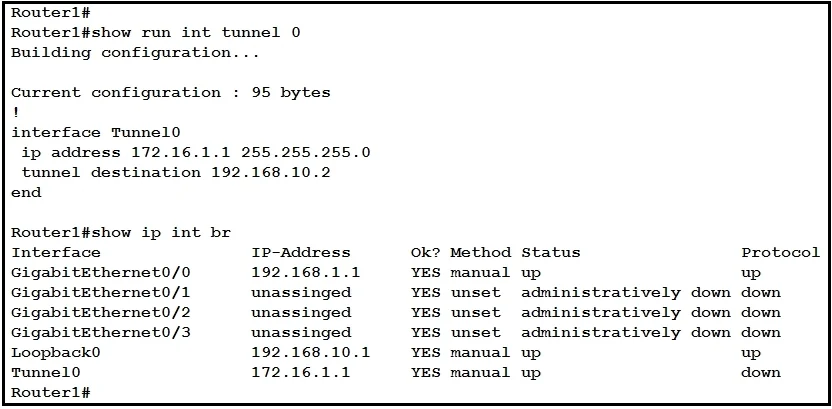
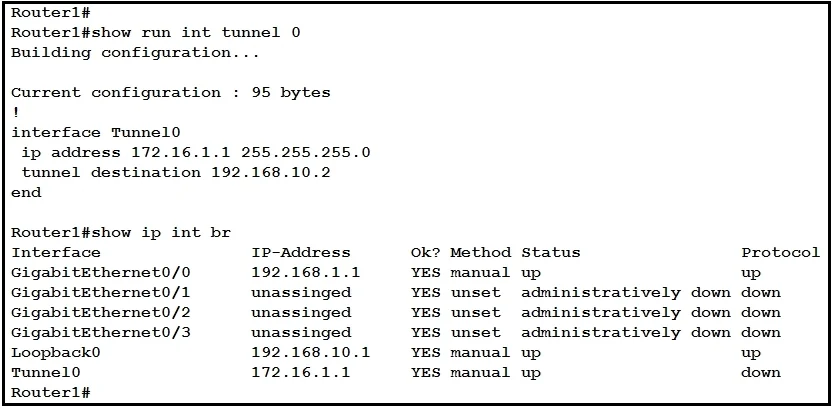
Refer to the exhibit. Which command must be applied to Router1 to bring the GRE tunnel to an up/up state?
The correct answer is D. Router1(config-if)#tunnel source Loopback0. GRE Tunnel Source Configuration Option D is correct because the GRE tunnel on Router1 must have a tunnel source that matches the IP address being used as the tunnel endpoint - and based on the exhibit context, Router1's Loopback0 interface holds the correct source IP that…
Question
Refer to the exhibit. Which command must be applied to Router1 to bring the GRE tunnel to an up/up state?
Exhibits
Options
- ARouter1(config)#interface tunnel0
- BRouter1(config-if)#tunnel source GigabitEthernet0/1
- CRouter1(config-if)#tunnel mode gre multipoint
- DRouter1(config-if)#tunnel source Loopback0
How the community answered
(26 responses)- B4% (1)
- C4% (1)
- D92% (24)
Explanation
GRE Tunnel Source Configuration
Option D is correct because the GRE tunnel on Router1 must have a tunnel source that matches the IP address being used as the tunnel endpoint - and based on the exhibit context, Router1's Loopback0 interface holds the correct source IP that Router2's tunnel destination is pointing to. Without a properly matched tunnel source, the tunnel cannot reach an up/up state.
Why the distractors are wrong:
- Option A simply enters interface tunnel0 configuration mode - it's a navigation command, not a solution that fixes the tunnel state.
- Option B configures GigabitEthernet0/1 as the tunnel source, but the exhibit indicates Router2's tunnel destination points to Router1's Loopback0 IP address, not the physical interface - creating a mismatch.
- Option C changes the tunnel mode to mGRE (used in DMVPN), which is unnecessary and incorrect for a standard point-to-point GRE tunnel setup shown in the exhibit.
Memory Tip: Think of it as a "matching handshake" - the tunnel source on one router must match the tunnel destination configured on the other router. When in doubt, check what IP address the remote router is pointing to, and make sure the local router sources from that same address.
Topics
Community Discussion
No community discussion yet for this question.