
350-401 · Question #1287
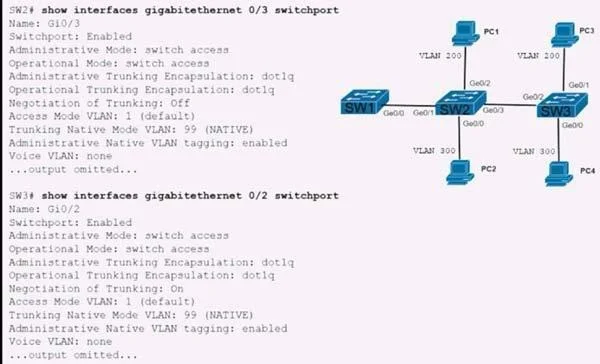
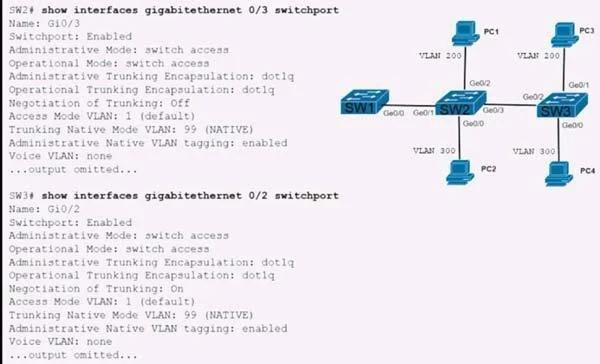
Refer to the exhibit. The trunk between SW2 and SW3 is not operational. Which action enables traffic for VLAN 200 to pass?
The correct answer is C. Configure switchport mode dynamic desirable on SW2 and SW3. To enable traffic for VLAN 200 on a non-operational trunk between SW2 and SW3, configuring switchport mode dynamic desirable on both interfaces will actively attempt to form a trunk, making it operational.
Question
Refer to the exhibit. The trunk between SW2 and SW3 is not operational. Which action enables traffic for VLAN 200 to pass?
Exhibits
Options
- AConfigure no switch mode trunk on SW2 and SW3.
- BConfigure switchport nonegotiate SW2 and SW3
- CConfigure switchport mode dynamic desirable on SW2 and SW3
- DConfigure vtp mode transparent on SW2 and SW3.
How the community answered
(41 responses)- A10% (4)
- B2% (1)
- C83% (34)
- D5% (2)
Why each option
To enable traffic for VLAN 200 on a non-operational trunk between SW2 and SW3, configuring `switchport mode dynamic desirable` on both interfaces will actively attempt to form a trunk, making it operational.
The command `no switch mode trunk` is syntactically incorrect and does not serve to enable trunking.
While `switchport nonegotiate` prevents DTP, it requires the interface to be explicitly configured as `switchport mode trunk` to form a trunk, and if the other side is in a dynamic state that doesn't resolve to a trunk, it won't work. It's not the most flexible solution.
Configuring `switchport mode dynamic desirable` on both SW2 and SW3 interfaces actively attempts to form a trunk link; if both ends are desirable, or one is desirable and the other is `dynamic auto` or `trunk`, a trunk will successfully form and become operational, allowing VLAN 200 traffic to pass.
`vtp mode transparent` affects how VLAN information is managed across the trunk, but it does not directly influence whether the physical trunk link itself forms or becomes operational.
Concept tested: Cisco DTP and trunking configuration
Source: https://www.cisco.com/c/en/us/td/docs/switches/lan/catalyst3750/software/release/12-2_35_se/configuration/guide/scg/swvlan.html
Topics
Community Discussion
No community discussion yet for this question.