
350-401 · Question #1237
Lab Simulation 19 Guidelines This is a lab item in which tasks will be performed on virtual devices. - Refer to the Tasks tab to view the tasks for this lab item. - Refer to the Topology tab to…
Lab Simulation 19 - Finance VRF Extension via GRE Tunnel Overall Goal This lab extends a VRF (Virtual Routing and Forwarding) instance called FINANCE across two routers (R11 and R22) using a GRE tunnel. The objective is traffic isolation: packets between VLAN 111 (on R11's…
Question
Exhibits
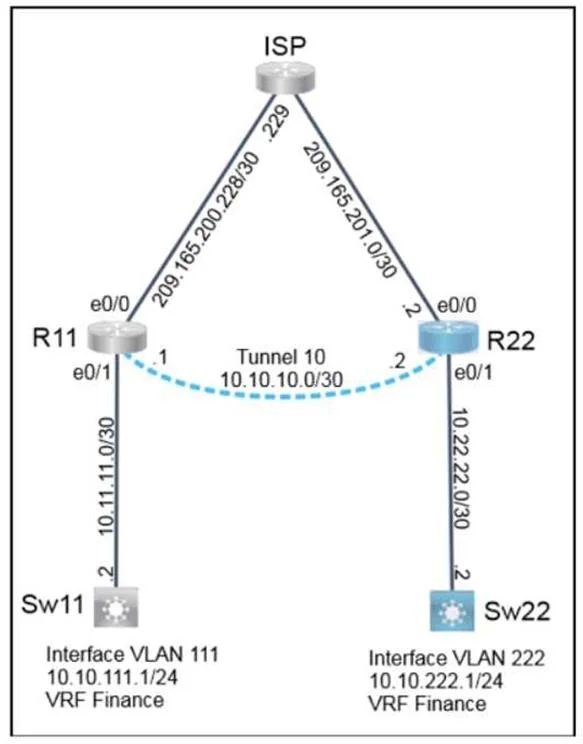
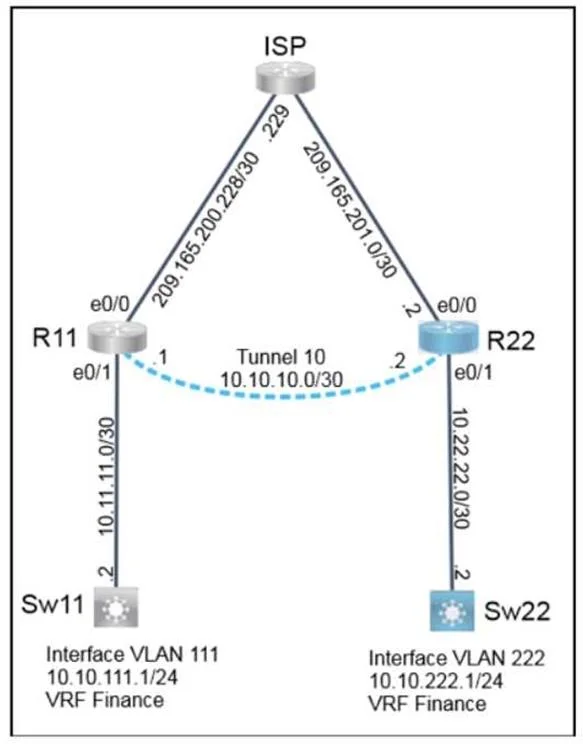
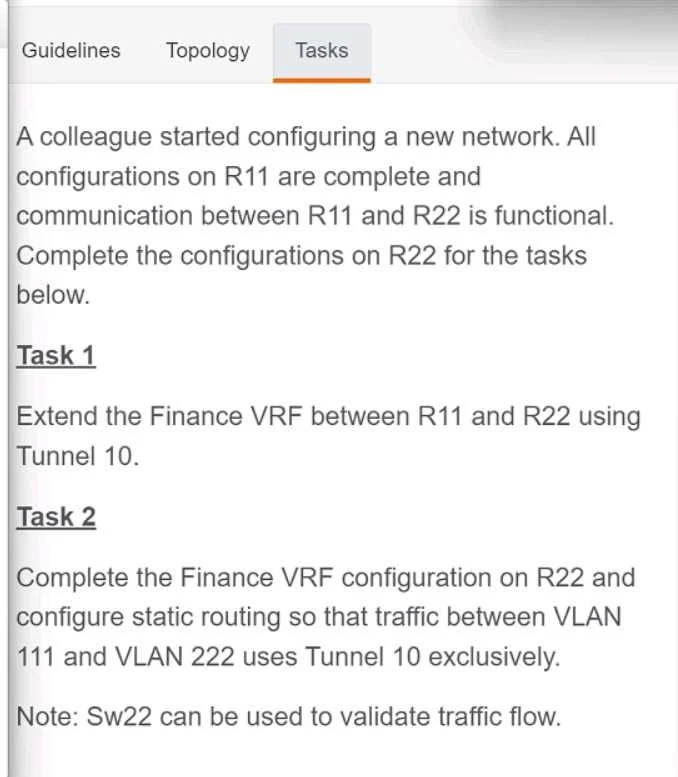
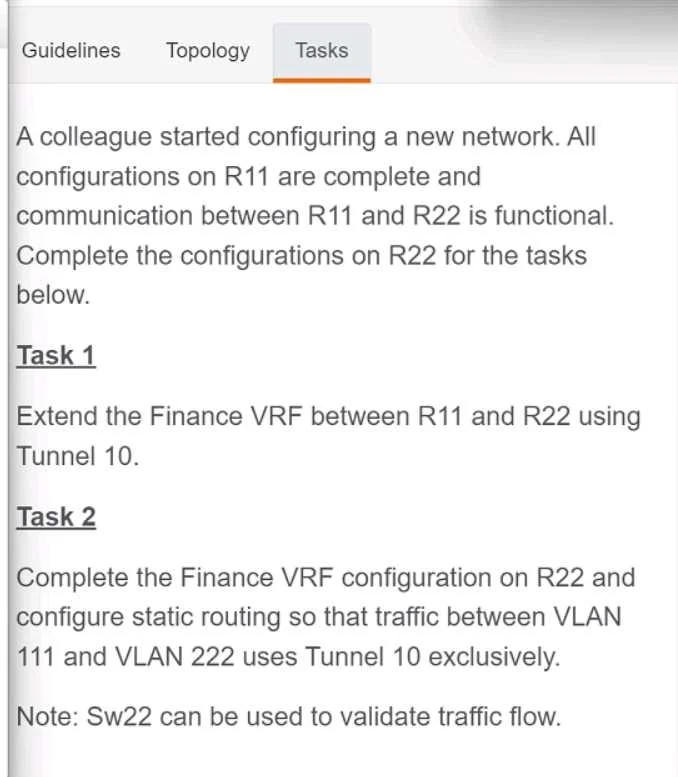
Explanation
Lab Simulation 19 - Finance VRF Extension via GRE Tunnel
Overall Goal
This lab extends a VRF (Virtual Routing and Forwarding) instance called FINANCE across two routers (R11 and R22) using a GRE tunnel. The objective is traffic isolation: packets between VLAN 111 (on R11's side) and VLAN 222 (on R22's side) must stay within the FINANCE VRF and travel exclusively through the tunnel - never leaking into the global routing table.
Why this approach? VRFs create separate routing tables on a single router, enabling network segmentation. Without a tunnel, two physically separate VRF instances cannot communicate over a shared WAN link without route leaking or MPLS. A GRE tunnel bridging the two VRFs solves this cleanly.
Step-by-Step Breakdown
Step 1 - int tun0
Enters configuration mode for Tunnel interface 0. Tunnel interfaces are logical (virtual) - they don't map to physical hardware. This is where the GRE encapsulation will be configured.
If skipped: You can't configure the tunnel at all.
Step 2 - vrf forwarding FINANCE
Assigns Tunnel 0 to the FINANCE VRF, placing it in that VRF's routing table rather than the global table.
Critical ordering rule: This command wipes any IP address already configured on the interface. You MUST apply VRF membership before assigning an IP address. Doing it after step 3 would clear the address and require re-entry.
If skipped: The tunnel would exist in the global routing table, causing Finance traffic to mix with other traffic - defeating the entire purpose of the VRF.
Step 3 - ip add 10.10.10.10 255.255.255.0 (answer key uses 10.10.10.2)
Assigns an IP address to the tunnel interface. This is the tunnel's logical endpoint IP - it's what routing protocols or static routes use to reference this side of the tunnel.
Note: The answer key shows
10.10.10.2while the procedure shows10.10.10.10. On a real exam, use whatever matches the topology diagram. R11 likely holds.1, making R22's address.2the correct answer.If skipped: The tunnel has no IP, so no routing can use it as a next-hop.
Step 4 - tunnel source e0/0
Tells the router which physical interface provides the source IP for GRE-encapsulated packets. The public IP of e0/0 becomes the outer source IP in the GRE header.
If skipped: The tunnel has no origin, so it stays down (
%Tunnel... down).
Step 5 - tunnel destination 209.165.200.230
Sets the remote endpoint of the tunnel - R11's public-facing IP. GRE packets are sent to this address.
If skipped: The tunnel doesn't know where to send packets; it remains non-functional. Both source and destination are required to bring a GRE tunnel up.
Step 6 - no shutdown
Administratively enables the tunnel interface. Tunnel interfaces default to shutdown state on some IOS versions, or may be down pending source/destination config.
If skipped: The tunnel is configured but stays administratively down - no traffic passes.
Step 7 - ip route vrf FINANCE 10.10.111.0 255.255.255.0 tunnel0
Installs a VRF-scoped static route inside the FINANCE routing table. It tells R22: "To reach VLAN 111's subnet (10.10.111.0/24), send traffic out tunnel0."
Note: The procedure lists this as
intricate vrf FINANCE ...- that's a typo. The correct command isip route vrf FINANCE.If skipped: R22 has no path to VLAN 111. Traffic from VLAN 222 destined for VLAN 111 would be dropped (no route in the FINANCE table).
Why VRF-scoped? A plain
ip routeadds the route to the global table, not the FINANCE table - traffic would escape the VRF.
Step 8 - int et0/1
Enters configuration mode for Ethernet 0/1 - the local interface connecting R22 to the VLAN 222 segment.
Step 9 - vrf forwarding FINANCE
Assigns et0/1 to the FINANCE VRF. This is the LAN-facing interface; VLAN 222 hosts need to reach resources through the Finance VRF.
Same ordering rule as Step 2: Apply VRF membership before the IP address. This command will clear any existing IP address on the interface.
If skipped: The interface is in the global table. VLAN 222 traffic would route globally, not through the Finance VRF.
Step 10 - ip address 10.22.22.1 255.255.255.252
Assigns the IP address to et0/1 within the FINANCE VRF. The /30 (255.255.255.252) is a point-to-point subnet - typical for router-to-switch uplinks.
If skipped: No IP connectivity for devices on the VLAN 222 side.
Step 11 - wr (write memory)
Saves the running configuration to NVRAM (startup-config). Without this, all configuration is lost on reload.
Exam rule: Labs typically require saving before moving to the next question. Missing this = losing all your work.
What Happens If Steps Are Out of Order
| Mistake | Consequence |
|---|---|
IP address before vrf forwarding | VRF assignment clears the IP - must re-enter |
tunnel source/dest before interface mode | Commands rejected (not in interface context) |
| Static route before tunnel is up | Route may install but traffic black-holes until tunnel comes up |
Skipping no shut | Tunnel stays down; route exists but is unusable |
Memory Tip
Think of it in three phases:
- Build the pipe -
int tun0-> assign VRF -> assign IP -> set source/dest -> enable (no shut) - Route the traffic -
ip route vrf FINANCEpointing the target subnet into the tunnel - Connect the LAN -
int et0/1-> assign VRF -> assign IP - Save - always
wrlast
The VRF-before-IP rule applies to every interface in both phases. Treat VRF assignment like putting on a label before writing the address - label first, address second.
Topics
Community Discussion
No community discussion yet for this question.