
350-401 · Question #1120
Lab Simulation 14 Guidelines This is a lab item in which tasks will be performed on virtual devices. - Refer to the Tasks tab to view the tasks for this lab item. - Refer to the Topology tab to…
OSPF DR/BDR Election Control - Lab Explanation --- Overall Goal OSPF elects a Designated Router (DR) and Backup Designated Router (BDR) on multi-access networks (like Ethernet) to reduce OSPF traffic - instead of every router forming adjacencies with every other router, all…
Question
Exhibits
Explanation
OSPF DR/BDR Election Control - Lab Explanation
Overall Goal
OSPF elects a Designated Router (DR) and Backup Designated Router (BDR) on multi-access networks (like Ethernet) to reduce OSPF traffic - instead of every router forming adjacencies with every other router, all routers form adjacencies only with the DR/BDR. This lab controls who participates in that election (and who wins it).
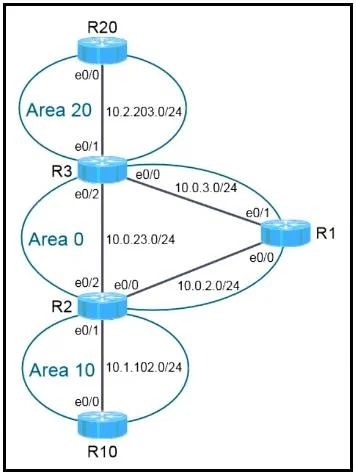
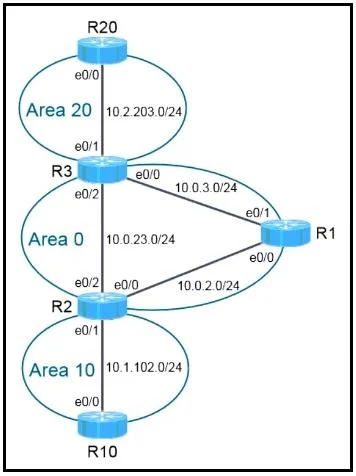
Task 1: Prevent DR/BDR Election on Area 20 (R3 & R20)
Why point-to-point instead of priority 0?
Setting ip ospf priority 0 tells a router "never become DR or BDR." But if both routers in Area 20 have priority 0, no DR can be elected, and OSPF adjacency will never reach FULL state - the network breaks.
The correct fix is ip ospf network point-to-point, which tells OSPF: "treat this link as a direct two-router connection - no DR/BDR election needed at all." This is valid because DR/BDR only matters on multi-access segments with 3+ routers.
Step-by-step reasoning:
Step 1 & 2 - Apply point-to-point on R3 e0/1 and R20 e0/0 These are the interfaces connecting R3 and R20 in Area 20. Both sides must match - if only one side is point-to-point, the network types mismatch and OSPF adjacency drops entirely.
Step 3 - Clear OSPF processes on R3 and R20
OSPF network type changes don't take effect on existing adjacencies without a reset. clear ip ospf process forces OSPF to re-negotiate the relationship using the new network type. Skipping this means the old DR/BDR state persists until the dead timer expires (up to 40 seconds by default), and the exam grader may check state immediately.
Step 4 - Verify with show ip ospf neighbor
The State column should show FULL/- (the - means no DR role assigned). The answer notes you should use the Address field, not the Neighbor ID, to positively identify R20 (router IDs can be confusing if they don't match interface IPs).
What breaks if skipped: Mismatched network types = no adjacency. Both set to priority 0 = no DR elected = OSPF stuck in EXSTART/EXCHANGE, never reaching FULL.
Task 2: Force R10 to Always Win the DR Election in Area 10
Why priority 255?
DR election is determined by highest OSPF priority (default: 1). Setting R10 to 255 (the maximum) guarantees it wins against any other router with a lower priority. The instruction says "do not change the router ID" - this rules out using a higher router ID as the tiebreaker.
Step 5 - Set ip ospf priority 255 on R10 e0/0
Only the interface connecting to Area 10 needs this change. Higher priority = DR. This is deterministic and survives reboots (unlike router ID tiebreakers which depend on discovery order).
Step 6 - Clear OSPF on R2 and R10 DR elections are not preemptive by default - an existing DR keeps its role until OSPF resets. Without clearing, R10's new priority won't be recognized until the next election. You must reset both routers in the segment so a fresh election occurs.
Step 7 - Verify on R2 with show ip ospf neighbor
R10's entry (identifiable by Address 10.1.102.10) should show state FULL/DR. R2 itself will show as BDR or DROTHER in its own neighbor table.
What breaks if skipped: Without clearing, the old DR retains its role. The lab grader will see R10 is not the DR and mark the task wrong even though the config is correct.
Step 8 - Save Configurations (copy run start)
Changes in RAM are lost on reload. Must be done on R3, R10, and R20 (the three routers you changed). R2 was only used for clearing/verification - its config was not modified.
What breaks if skipped: The exam explicitly requires saving to NVRAM. The grader may reload devices to verify persistence.
Memory Tip
| Goal | Tool | Why |
|---|---|---|
| No DR/BDR on a 2-router segment | network point-to-point | Eliminates election entirely - safe with 2 routers |
| Always win the DR election | priority 255 | Highest value wins; max is 255 |
| Never win (but keep adjacency) | priority 0 | Only safe when other routers can still elect a DR |
The golden rule: After any OSPF election-related change, always clear ip ospf process on all routers on that segment - OSPF elections are not preemptive.
Topics
Community Discussion
No community discussion yet for this question.