
300-810 · Question #293
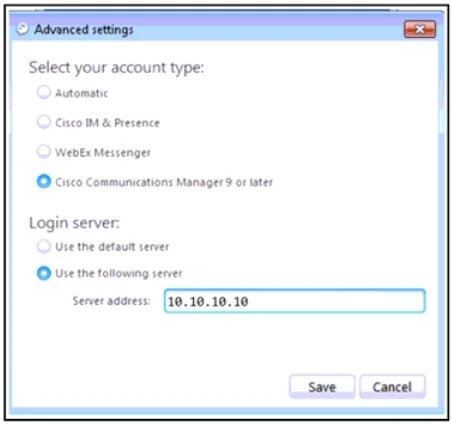
Refer to the exhibit. An engineer must configure service discovery for Cisco Jabber for Windows. The engineer configures SRV records on the DNS server but still sees the Cisco UCM IP address…
The correct answer is A. Open a Command Prompt window and run the ipconfig /flushdns command. E. Set the Jabber account type to Automatic. Two actions are needed: (A) Running 'ipconfig /flushdns' clears the local DNS resolver cache on the Windows machine, forcing it to re-query the DNS server and pick up the newly added SRV records instead of using a cached response. (E) Setting the Jabber account type to…
Question
Refer to the exhibit. An engineer must configure service discovery for Cisco Jabber for Windows. The engineer configures SRV records on the DNS server but still sees the Cisco UCM IP address manually configured in Jabber. Which two actions must the engineer take to resolve the issue? (Choose two.)
Exhibit
Options
- AOpen a Command Prompt window and run the ipconfig /flushdns command.
- BPoint the Cisco IM and Presence server to the SRV records.
- CSave the configuration and reset Jabber.
- DRestart the XCP and XMPP services.
- ESet the Jabber account type to Automatic.
How the community answered
(26 responses)- A77% (20)
- B15% (4)
- C4% (1)
- D4% (1)
Explanation
Two actions are needed: (A) Running 'ipconfig /flushdns' clears the local DNS resolver cache on the Windows machine, forcing it to re-query the DNS server and pick up the newly added SRV records instead of using a cached response. (E) Setting the Jabber account type to 'Automatic' enables service discovery mode - without this, Jabber uses the manually entered UCM IP address regardless of what DNS returns. Options B and D relate to server-side services, not the client-side configuration issue shown. Option C (Save and Reset) alone would not fix a DNS cache or account type issue.
Topics
Community Discussion
No community discussion yet for this question.