
300-810 · Question #206
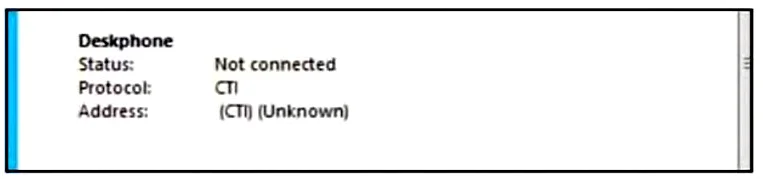
Refer to the exhibit. A collaboration engineer is troubleshooting a Cisco Jabber for Windows client issue. The end user is reporting that they cannot control the desk phone from the Cisco Jabber…
The correct answer is A. Associate the User with the desk phone under the user configuration page on Cisco UCM. For Cisco Jabber to control a desk phone via CTI (Computer Telephony Integration), the end user must be associated with that phone in Cisco UCM's user configuration page. Without this association, the UCM has no mapping between the user account and the physical device, so CTI…
Question
Refer to the exhibit. A collaboration engineer is troubleshooting a Cisco Jabber for Windows client issue. The end user is reporting that they cannot control the desk phone from the Cisco Jabber client. Which action must the engineer take to resolve this issue?
Exhibit
Options
- AAssociate the User with the desk phone under the user configuration page on Cisco UCM
- BSelect "Primary Line" under the user configuration page on Cisco UCM
- CAdd the "Allow control of the device from the CTI" option under the client services profile
- DAdd the "Allow control of the device from the CTI" option under the desk phone configuration
How the community answered
(18 responses)- A83% (15)
- B11% (2)
- D6% (1)
Explanation
For Cisco Jabber to control a desk phone via CTI (Computer Telephony Integration), the end user must be associated with that phone in Cisco UCM's user configuration page. Without this association, the UCM has no mapping between the user account and the physical device, so CTI control is impossible regardless of other settings. Option C refers to a 'Client Services Profile' setting which does not exist in standard UCM CTI configuration - the CTI permission is a user device association plus a user role/permission. The root cause here is the missing device-to-user association.
Topics
Community Discussion
No community discussion yet for this question.