
300-810 · Question #160
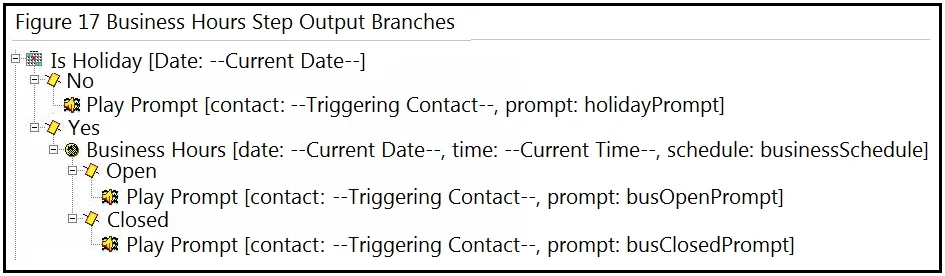
Refer to the exhibit. An administrator is configuring the auto-attendant script for a Cisco Unity Express integration to Cisco UCME and wants to play the "busOpenPrompt" wave file when it is not a…
The correct answer is C. Check the Business Hours only if the "Is Holiday" prompt returns a "No". The correct logic flow for a holiday-aware auto-attendant is: first check 'Is Holiday?' - if YES, route to the holiday/closed path; if NO (not a holiday), then check business hours. Only when it is NOT a holiday should the script proceed to check whether the business is open or…
Question
Refer to the exhibit. An administrator is configuring the auto-attendant script for a Cisco Unity Express integration to Cisco UCME and wants to play the "busOpenPrompt" wave file when it is not a holiday. How should the script be configured to accomplish this goal?
Exhibit
Options
- ACheck the Business Hours only if the "Is Holiday" prompt returns a "Yes".
- BSwap the Open and Closed branches in the script.
- CCheck the Business Hours only if the "Is Holiday" prompt returns a "No".
- DSwap the "busOpenPrompt" with "busClosedPrompt".
How the community answered
(55 responses)- A16% (9)
- B4% (2)
- C75% (41)
- D5% (3)
Explanation
The correct logic flow for a holiday-aware auto-attendant is: first check 'Is Holiday?' - if YES, route to the holiday/closed path; if NO (not a holiday), then check business hours. Only when it is NOT a holiday should the script proceed to check whether the business is open or closed and play the busOpenPrompt accordingly. If the business hours check runs regardless of the holiday result, the script may play busOpenPrompt even on holidays. Configuring the Business Hours check to run only on the 'No' (not a holiday) branch ensures busOpenPrompt is only played when the business is open on a non-holiday day.
Topics
Community Discussion
No community discussion yet for this question.