
300-810 · Question #115
An engineer is working on a Cisco Unity Express system and notices that users that exist on the integrated Cisco Unified Communications Manager Express are missing from Cisco Unity Express. Which…
The correct answer is B. Use the Synchronize task under the User ID field. C. Use the Synchronize information under Administration. To resolve missing users between Cisco Unified Communications Manager Express (UCME) and Cisco Unity Express (CUE), the engineer can initiate a synchronization operation through the CUE GUI. 'Synchronize task under the User ID field' (B) and 'Synchronize information under…
Question
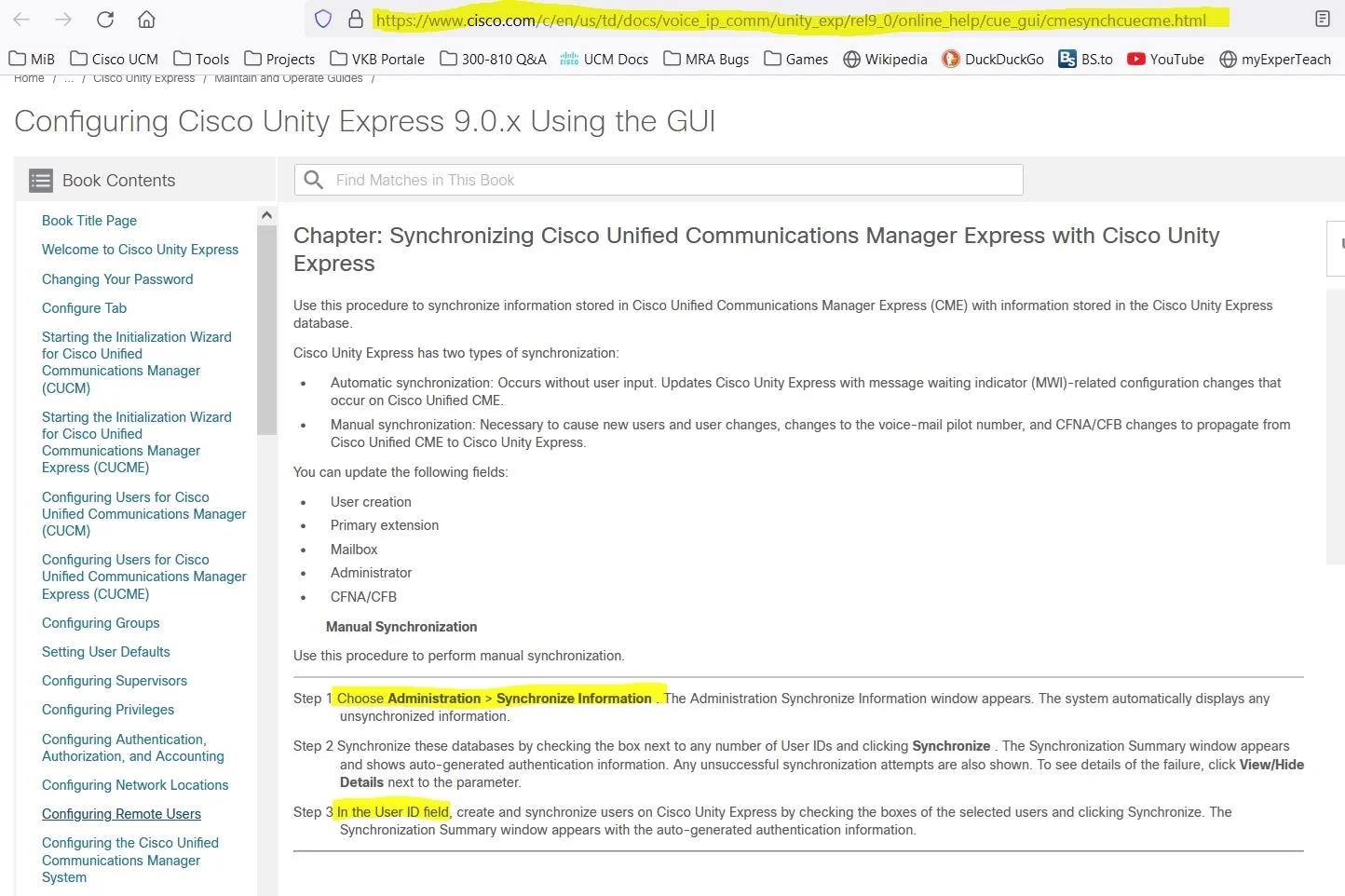
An engineer is working on a Cisco Unity Express system and notices that users that exist on the integrated Cisco Unified Communications Manager Express are missing from Cisco Unity Express. Which two actions using the GUI resolve this discrepancy? (Choose two)
Exhibit
Options
- AUse the Synchronize system under MWI.
- BUse the Synchronize task under the User ID field.
- CUse the Synchronize information under Administration.
- DAdd the missing users manually to Cisco Unity Express.
- EImport the users using a CSV file.
How the community answered
(34 responses)- A6% (2)
- B91% (31)
- D3% (1)
Explanation
To resolve missing users between Cisco Unified Communications Manager Express (UCME) and Cisco Unity Express (CUE), the engineer can initiate a synchronization operation through the CUE GUI. 'Synchronize task under the User ID field' (B) and 'Synchronize information under Administration' (C) both trigger CUE to pull updated user data from the integrated UCME system. Options A (Synchronize under MWI) is not a valid sync path for users, and manually adding users (D) or importing via CSV (E), while functionally possible, are not the correct GUI synchronization paths that leverage the UCME-CUE integration to resolve the discrepancy automatically.
Topics
Community Discussion
No community discussion yet for this question.