
300-810 · Question #150
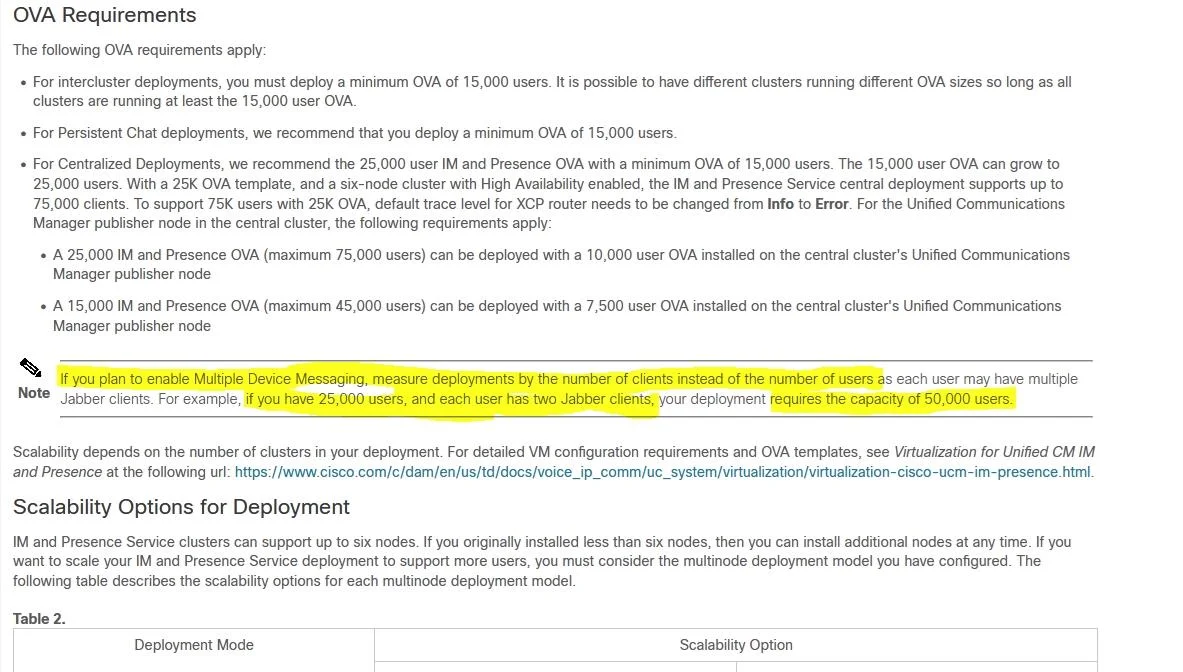
A Cisco Unified IM and Presence version 11.5.1 on-premises deployment of instant messaging with a capacity of 50,000 users includes the multiple device messaging feature. Each of the 30,000 users…
The correct answer is A. Increase capacity to 90,000+ to match the number of Jabber clients. With the multiple device messaging feature enabled in Cisco IM and Presence 11.5.1, each active Jabber client session (device) consumes a user license slot - not just the user account. Since 30,000 users each have 3 active Jabber clients, the effective session count is 30,000 ×…
Question
A Cisco Unified IM and Presence version 11.5.1 on-premises deployment of instant messaging with a capacity of 50,000 users includes the multiple device messaging feature. Each of the 30,000 users has 3 Jabber clients. The customer reports that messages are not being received on all 3 clients. What should the administrator do to resolve this issue?
Exhibit
Options
- AIncrease capacity to 90,000+ to match the number of Jabber clients.
- BIncrease capacity to 60,000 users to service all Jabber clients.
- CIncrease capacity to 72,000 users to service all Jabber clients.
- DIncrease capacity to 30,000 users to match the number of Jabber clients.
How the community answered
(46 responses)- A80% (37)
- B7% (3)
- C11% (5)
- D2% (1)
Explanation
With the multiple device messaging feature enabled in Cisco IM and Presence 11.5.1, each active Jabber client session (device) consumes a user license slot - not just the user account. Since 30,000 users each have 3 active Jabber clients, the effective session count is 30,000 × 3 = 90,000. The current capacity of 50,000 is insufficient to support all concurrent client sessions, causing some devices to not receive messages. The system capacity must be increased to at least 90,000+ to accommodate all client connections. Options B (60,000), C (72,000), and D (30,000) do not account for the full 3× client multiplier.
Topics
Community Discussion
No community discussion yet for this question.