
300-510 · Question #248
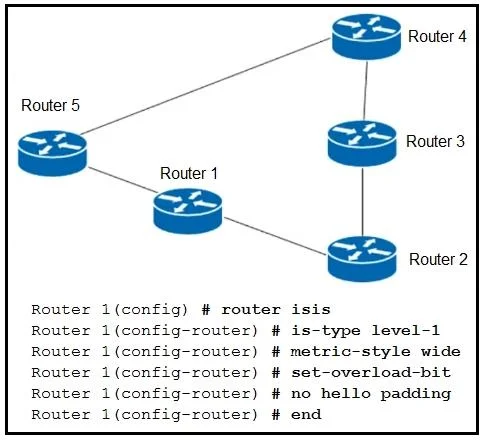
Refer to the exhibit. A network engineer commissioned Router 1, which connects to Router 2 and Router 5. Router 1 participates in IS-1S routing with other routers, but it is not used for transit…
The correct answer is A. Remove the overload bit on Router 1. Removing the overload bit on Router 1 fixes the problem because the IS-IS overload bit signals to all other routers in the domain to avoid using that router as a transit hop - when set, neighboring routers will only send traffic to Router 1 (for directly connected…
Question
Refer to the exhibit. A network engineer commissioned Router 1, which connects to Router 2 and Router 5. Router 1 participates in IS-1S routing with other routers, but it is not used for transit traffic. Traffic from Router 2 to Router 5 is expected to travel via Router 1, but the traffic is travelling via Router 3 and Router 4. Which action resolves this problem?
Exhibit
Options
- ARemove the overload bit on Router 1.
- BAdd hello padding on Router 1
- CRemove the hello padding on Router 5.
- DAdd the overload bit on Router 5.
How the community answered
(49 responses)- A71% (35)
- B4% (2)
- C16% (8)
- D8% (4)
Explanation
Removing the overload bit on Router 1 fixes the problem because the IS-IS overload bit signals to all other routers in the domain to avoid using that router as a transit hop - when set, neighboring routers will only send traffic to Router 1 (for directly connected destinations), not through it. Since Router 1 was recently commissioned, the overload bit was likely set intentionally or automatically to prevent transit traffic during initialization, causing Router 2's traffic to detour via Router 3 and Router 4 instead of the direct path through Router 1. Option B (hello padding) is irrelevant - it relates to MTU mismatch detection during adjacency formation, not traffic path selection. Option C is similarly irrelevant; hello padding on Router 5 has no effect on how transit traffic is routed through the network. Option D would make the problem worse, not better - setting the overload bit on Router 5 would cause traffic to avoid transiting Router 5, not fix Router 1.
Memory tip: Think of the overload bit as a "do not disturb" sign on a router - traffic will go around it rather than through it. If a newly commissioned router is being bypassed, the first thing to check is whether that sign is still up.
Topics
Community Discussion
No community discussion yet for this question.