
300-510 · Question #206
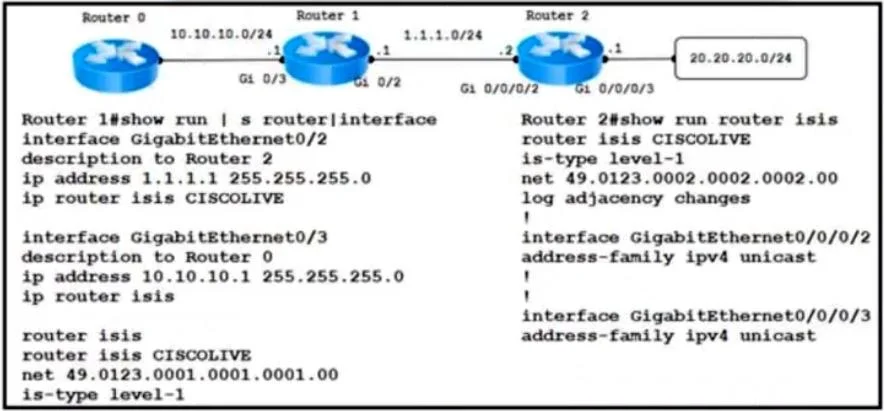
Refer to the exhibit. An engineer is troubleshooting a network routing issue on this IS-IS network situated at the customer's regional hub. Router 2 that runs Cisco IOS XR Software cannot see the…
The correct answer is C. On router 1, add the CISCOLIVE keyword after the IP router isis command under interface. In Cisco IOS (and IOS XE), IS-IS processes can be named, and the command to enable IS-IS on an interface is ip router isis [process-tag]. The process-tag (in this case 'CISCOLIVE') must match the tag used in the global router isis CISCOLIVE configuration block. If the interface…
Question
Refer to the exhibit. An engineer is troubleshooting a network routing issue on this IS-IS network situated at the customer's regional hub. Router 2 that runs Cisco IOS XR Software cannot see the network 10.1.1.0/24 on router 1. The Layer 2 encapsulations are correct. The ARP connectivity for the Ethernet interface that runs IS-IS is working. Which action resolves the issue?
Exhibit
Options
- AOn router 1, remove the CISCOLIVE keyword after the IP router Isis command under interface
- BUnder the router isis command on router 1. Change is-type level-1 to is-type level-2.
- COn router 1, add the CISCOLIVE keyword after the IP router isis command under interface
- DUnder the router isis command on router 2. Change is-type level-1 to is-type level-2.
How the community answered
(28 responses)- A11% (3)
- B4% (1)
- C79% (22)
- D7% (2)
Explanation
In Cisco IOS (and IOS XE), IS-IS processes can be named, and the command to enable IS-IS on an interface is ip router isis [process-tag]. The process-tag (in this case 'CISCOLIVE') must match the tag used in the global router isis CISCOLIVE configuration block. If the interface on Router 1 has the ip router isis command without the CISCOLIVE tag - or is missing the tag - that interface is not associated with the correct IS-IS instance and will not participate in IS-IS adjacency formation on that process. As a result, the network 10.1.1.0/24 reachable via that interface will not be advertised. The fix is to add the CISCOLIVE keyword to the interface-level ip router isis command. Option A (removing the keyword) would make the association worse. Options B and D involve changing the IS-IS level type, which is unrelated to the instance-tagging issue described.
Topics
Community Discussion
No community discussion yet for this question.