
300-410 · Question #2
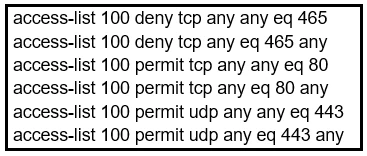
Refer to the exhibit. During troubleshooting it was discovered that the device is not reachable using a secure web browser. What is needed to fix the problem?
The correct answer is B. permit tcp port 443. To allow access to a device using a secure web browser, TCP port 443 must be permitted in the network's access control configurations.
Question
Exhibit
Options
- Apermit tcp port 465
- Bpermit tcp port 443
- Cpermit udp port 465
- Dpermit tcp port 22
How the community answered
(61 responses)- A3% (2)
- B90% (55)
- C2% (1)
- D5% (3)
Why each option
To allow access to a device using a secure web browser, TCP port 443 must be permitted in the network's access control configurations.
TCP port 465 is typically used for SMTPS (Simple Mail Transfer Protocol Secure), which is for email submission, not secure web browsing.
Secure web browsers use HTTPS (Hypertext Transfer Protocol Secure) for encrypted communication, which by default operates on TCP port 443. To allow a device to be reachable via a secure web browser, the network must permit incoming TCP traffic on port 443.
UDP port 465 is not a standard port for secure web browsing and is generally not associated with SMTPS, which uses TCP.
TCP port 22 is used for SSH (Secure Shell) access, which provides secure command-line access, not secure web browsing.
Concept tested: Standard network ports for secure services
Source: https://www.iana.org/assignments/service-names-port-numbers/service-names-port-numbers.xhtml
Topics
Community Discussion
No community discussion yet for this question.