
2V0-621 · Question #210
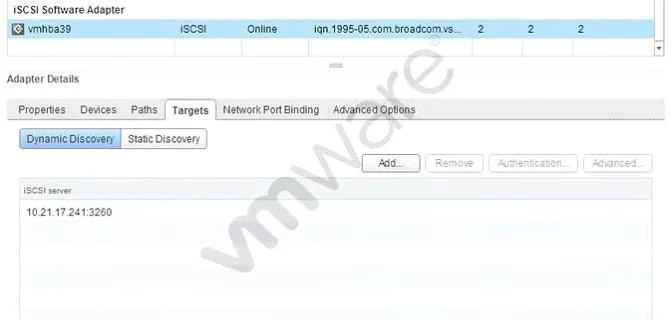
Refer to the Exhibit. Which tab shows the Hardware Acceleration support status?
The correct answer is A. Devices. In vSphere, the Hardware Acceleration (VAAI) support status for a storage device is displayed on the Devices tab of the datastore properties dialog. This tab shows each backing device alongside its VAAI capability status.
Question
Refer to the Exhibit. Which tab shows the Hardware Acceleration support status?
Exhibit
Options
- ADevices
- BProperties
- CPaths
- DAdvanced Options
How the community answered
(30 responses)- A90% (27)
- B7% (2)
- D3% (1)
Why each option
In vSphere, the Hardware Acceleration (VAAI) support status for a storage device is displayed on the Devices tab of the datastore properties dialog. This tab shows each backing device alongside its VAAI capability status.
The Devices tab in the datastore properties dialog lists the underlying storage device and includes a Hardware Acceleration column that reports the VAAI status as Supported, Not Supported, or Unknown, making it the correct location to verify offload capability.
The Properties tab shows general datastore metadata such as name, type, and total capacity but does not include any hardware acceleration status information.
The Paths tab displays multipathing information including the path selection policy and path states, not VAAI support status.
The Advanced Options tab exposes configurable datastore parameters rather than displaying the hardware acceleration support status of the backing device.
Concept tested: VAAI Hardware Acceleration status in vSphere datastore UI
Source: https://docs.vmware.com/en/VMware-vSphere/7.0/com.vmware.vsphere.storage.doc/GUID-6F6A4C8E-A3D0-4C13-AF7B-8D21E7C5E5B9.html
Topics
Community Discussion
No community discussion yet for this question.