
2V0-621 · Question #105
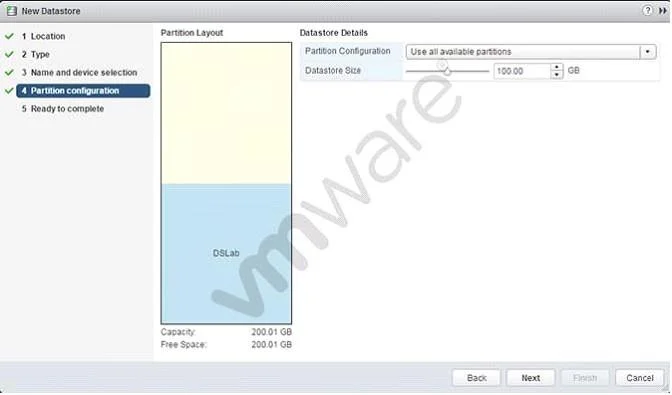
Refer to the Exhibit. What will be created upon completion of the steps in this wizard?
The correct answer is A. 100GB VMFS5 datastore with free space available for expansion. The wizard creates a 100GB VMFS5 datastore on a larger disk, leaving the remaining capacity available to extend that same datastore later.
Question
Refer to the Exhibit. What will be created upon completion of the steps in this wizard?
Exhibit
Options
- A100GB VMFS5 datastore with free space available for expansion
- B100GB VMFS5 datastore with free space available for a second datastore
- C100GB VMFS3 datastore
- D200.01 GB VMFS5 datastore
How the community answered
(42 responses)- A83% (35)
- B5% (2)
- C10% (4)
- D2% (1)
Why each option
The wizard creates a 100GB VMFS5 datastore on a larger disk, leaving the remaining capacity available to extend that same datastore later.
When adding a VMFS5 datastore through the vSphere wizard, you can partition only a portion of the available disk capacity. The remaining unallocated space stays on the same LUN and can later be used to expand the existing VMFS5 datastore via the 'Increase Datastore Capacity' option, rather than being claimed for a separate datastore.
Free space left on the LUN after a VMFS partition is created can only expand the existing datastore, not automatically provision a second separate datastore.
VMFS3 is an older version not created by default in modern vSphere environments; the new datastore wizard creates VMFS5, which supports larger block sizes and more features.
The wizard is configured to create a 100GB partition, not to consume the full disk; the remaining space is left unallocated for future expansion of the same datastore, not merged into a 200GB volume.
Concept tested: VMFS5 datastore creation and capacity allocation
Source: https://docs.vmware.com/en/VMware-vSphere/6.7/com.vmware.vsphere.storage.doc/GUID-7B6F2E6E-05FF-4E67-A833-EC33CE4E0A21.html
Topics
Community Discussion
No community discussion yet for this question.