
200-901 · Question #494
Drag and Drop Question Refer to the exhibit. Drag and drop the code snippets from the bottom into the blanks in the Python code to import the Cisco Meraki library and set the API key for…
The correct answer is x_cisco_meraki_api_key; meraki_dashboard_api.meraki import Meraki; Meraki(x_cisco_meraki_api_key). The question requires correctly placing Python code snippets to import the Cisco Meraki library, assign an API key, and initialize the Meraki client object based on standard Python syntax and SDK documentation.
Question
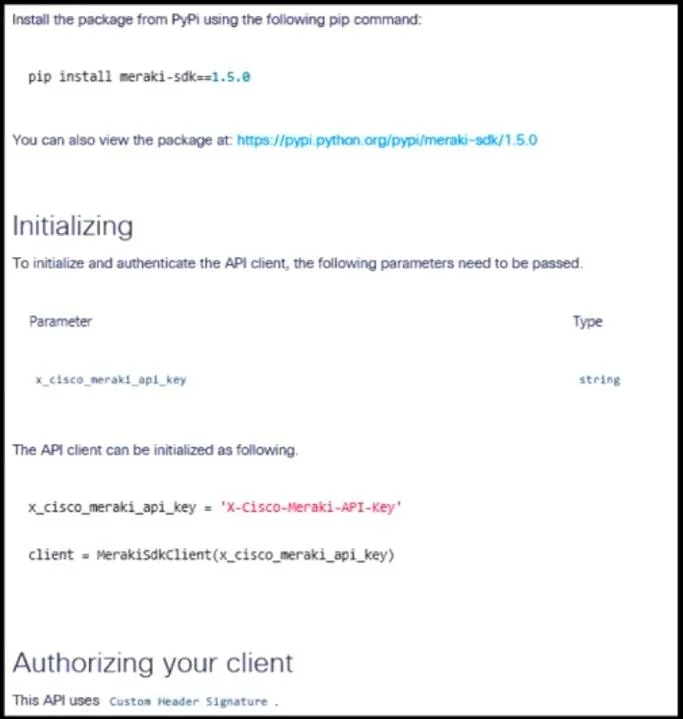
Drag and Drop Question Refer to the exhibit. Drag and drop the code snippets from the bottom into the blanks in the Python code to import the Cisco Meraki library and set the API key for authorization. Answer:
Exhibit
Answer Area
Drag items
Correct arrangement
- x_cisco_meraki_api_key
- meraki_dashboard_api.meraki import Meraki
- Meraki(x_cisco_meraki_api_key)
Explanation
The question requires correctly placing Python code snippets to import the Cisco Meraki library, assign an API key, and initialize the Meraki client object based on standard Python syntax and SDK documentation.
Approach. To correctly fill the blanks:
- The first blank is part of the line
________ = "093b24e85d15a3e66f1fc359f4c48493eaa". This line is assigning a string value (which is an API key) to a variable. Consulting the documentation under 'Initializing', it explicitly states the parameter for the API client isx_cisco_meraki_api_keyand shows an examplex_cisco_meraki_api_key = 'X-Cisco-Meraki-API-KEY'. Therefore, the correct drag-and-drop option for this blank isx_cisco_meraki_api_key. - The second blank is part of the line
from ________. This is a Python 'from-import' statement used to import specific components from a module or package. The available drag-and-drop optionmeraki_dashboard_api.meraki import Merakiperfectly fits this syntax, indicating that theMerakiclass is being imported from themeraki_dashboard_api.merakimodule. Thus, the correct option ismeraki_dashboard_api.meraki import Meraki. - The third blank is part of the line
meraki = ________. This line is responsible for initializing or instantiating the Meraki client object. The documentation showsclient = MerakiSdkClient(x_cisco_meraki_api_key). While the class name differs slightly (Merakiinstead ofMerakiSdkClient) in the options, the pattern is the same: instantiate the client class and pass the API key. The remaining drag-and-drop option,Meraki(x_cisco_meraki_api_key), correctly instantiates theMerakiclass and passes the previously defined API key (x_cisco_meraki_api_key) as an argument. Therefore, the correct option isMeraki(x_cisco_meraki_api_key).
Common mistakes.
- common_mistake. Common mistakes include misplacing the drag-and-drop options due to a misunderstanding of Python syntax or the logical flow of API client initialization. For example, placing
Meraki(x_cisco_meraki_api_key)into the variable assignment blank (x_cisco_meraki_api_key = ...) would be incorrect becauseMeraki(...)is a function call or class instantiation, not a variable name. Similarly, puttingx_cisco_meraki_api_keyinto the 'from-import' statement would be syntactically wrong, as this statement expects a module path and theimportkeyword followed by the object to be imported. Misinterpreting the documentation's example ofMerakiSdkClientversus the providedMerakiclass in the options could also lead to confusion if one rigidly expects an exact match rather than understanding the underlying pattern of client instantiation.
Concept tested. Python programming fundamentals including variable assignment, module importing (from ... import ... syntax), object instantiation (calling a class constructor), and understanding common patterns for interacting with Software Development Kits (SDKs) for API authentication (specifically, handling API keys). It also tests the ability to interpret technical documentation to implement code.
Topics
Community Discussion
No community discussion yet for this question.