
200-901 · Question #495
Drag and Drop Question An engineer must configure devices over Cisco DNA Center. A repository already exists that contains scripts to communicate with Cisco DNA Center over APIs. The engineer wants…
The correct answer is Navigate to the main page of a repository named DNA.; Click the Clone or download button.; From Clone with HTTPS, copy the clone URL for the repository.; Run the $ git clone hostname/YOUR-USERNAME/DNA command. The correct interaction involves ordering the steps for cloning a Git repository, starting with navigating to the repository, finding the clone URL, and then executing the 'git clone' command.
Question
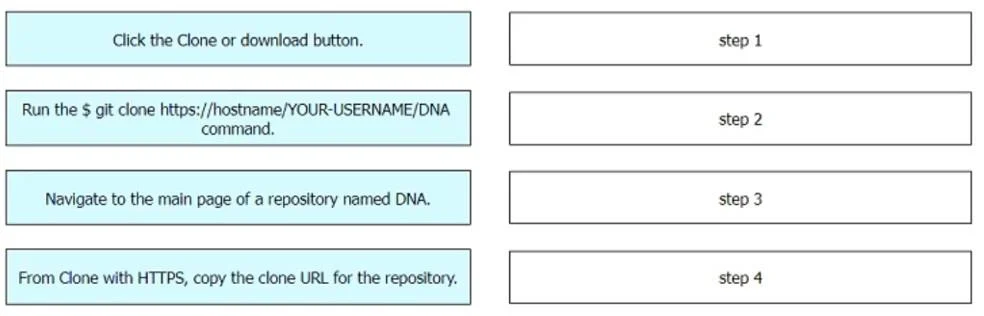
Drag and Drop Question An engineer must configure devices over Cisco DNA Center. A repository already exists that contains scripts to communicate with Cisco DNA Center over APIs. The engineer wants to add their own scripts to the same repository. Drag and drop the actions from the left into the order on the right to clone a Git repository named DNA. Answer:
Exhibit
Answer Area
Drag items
Correct arrangement
- Navigate to the main page of a repository named DNA.
- Click the Clone or download button.
- From Clone with HTTPS, copy the clone URL for the repository.
- Run the $ git clone hostname/YOUR-USERNAME/DNA command.
Explanation
The correct interaction involves ordering the steps for cloning a Git repository, starting with navigating to the repository, finding the clone URL, and then executing the 'git clone' command.
Approach. The correct interaction is to drag and drop the actions into the following sequence:
- Step 1: Navigate to the main page of a repository named DNA. Before you can get the clone URL or clone the repository, you must first locate and access its dedicated page on the Git hosting service (e.g., GitHub, GitLab, Bitbucket).
- Step 2: Click the Clone or download button. Once on the repository's main page, most Git hosting platforms provide a button (often labeled 'Code' or 'Clone or download') that, when clicked, reveals the options for cloning or downloading the repository.
- Step 3: From Clone with HTTPS, copy the clone URL for the repository. After clicking the 'Clone or download' button, various cloning methods (like HTTPS or SSH) are presented. The next logical step is to select the desired method (HTTPS, as specified in the option) and copy the corresponding URL.
- Step 4: Run the $ git clone https://hostname/YOUR-USERNAME/DNA command. With the correct HTTPS clone URL copied, the final step is to open a terminal or command prompt on your local machine and execute the 'git clone' command, pasting the copied URL as an argument, to download a local copy of the repository.
Common mistakes.
- common_mistake. A common mistake would be attempting to run the 'git clone' command without first obtaining the correct clone URL, or trying to click the 'Clone or download' button or copy the URL before navigating to the repository's main page. The process of cloning a Git repository requires a logical flow: find the repository, get the URL, then execute the command. Any deviation from this order would prevent successful cloning. For example, starting with 'Click the Clone or download button' is incorrect because you need to be on the repository's page first. Starting with 'Run the $ git clone...' is incorrect because you don't yet have the URL to use with the command.
Concept tested. Git repository management, specifically the workflow for cloning a remote Git repository using a web interface and the 'git clone' command line utility. This tests understanding of how to interact with Git hosting services and the fundamental Git operations.
Topics
Community Discussion
No community discussion yet for this question.