
200-901 · Question #670
Drag and Drop Question Refer to the exhibit. An engineer needs to retrieve all the organizations in a Cisco UCS Manager deployment. Drag and drop the code snippets from the bottom onto the blanks in…
The correct answer is UcsHandle; UcsHandle; login; query_classid. The question tests the ability to construct a Python script using the UCS SDK to connect to a Cisco UCS Manager and retrieve all organizations by their class ID.
Question
Exhibit
Answer Area
Drag items
Correct arrangement
- UcsHandle
- UcsHandle
- login
- query_classid
Explanation
The question tests the ability to construct a Python script using the UCS SDK to connect to a Cisco UCS Manager and retrieve all organizations by their class ID.
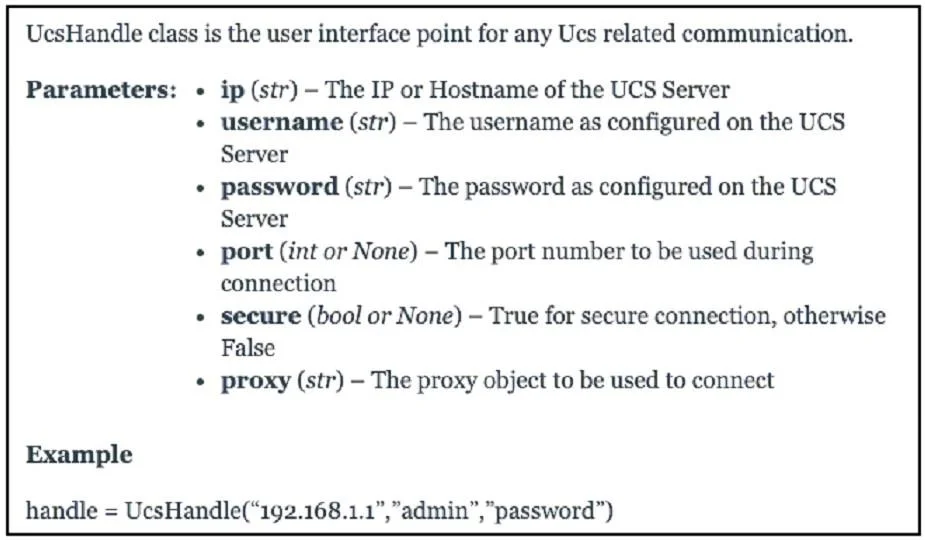
Approach. 1. The first blank, 'from ucsmsdk.ucshandle import ', requires importing the main class for UCS communication, which, according to the provided documentation, is UcsHandle. Thus, 'UcsHandle' is dragged to the first blank.
2. The second blank, 'connection = _______ ('10.10.20.113', 'ucspe', 'ucspe')', involves instantiating the connection object. Based on the documentation example 'handle = UcsHandle("192.168.1.1","admin","password")', the UcsHandle class is used for this purpose. So, 'UcsHandle' is dragged to the second blank.
3. The third blank, 'connection. ()', appears after the connection object has been created. To establish a session with UCS Manager, the connection object needs to log in. Among the options, 'login' is the appropriate method for this step. So, 'login' is dragged to the third blank.
4. The fourth blank, 'ucsm_orgs = connection._______ ('orgOrg')', aims to retrieve UCS organizations. The argument 'orgOrg' represents a class ID in UCS Manager. The method 'query_classid' is specifically designed to query managed objects by their class identifier. Therefore, 'query_classid' is dragged to the fourth blank.
Common mistakes.
- common_mistake. 1. Using 'UcsConnection' instead of 'UcsHandle': The provided documentation explicitly defines
UcsHandleas the user interface point for UCS communication and provides an example usingUcsHandle. 'UcsConnection' is not presented as the class for direct instantiation in this context.
- Forgetting to call 'login()': A common error in API interactions is attempting to perform operations (like querying) before establishing an authenticated session. The
login()method is essential to authenticate the connection. - Using 'query' instead of 'query_classid': While 'query' might be a generic method, 'query_classid' is more specific and appropriate when the exact class ID ('orgOrg') is known and provided as an argument, directly addressing the requirement to retrieve objects of a specific type.
- Using 'init' for login or query: 'init' is typically a constructor method in Python classes (e.g.,
__init__) and is not used as an external method call for operations like logging in or querying data.
Concept tested. Python scripting for Cisco UCS Manager automation, specifically using the Cisco UCS SDK (ucsm-sdk) to connect to UCS Manager, authenticate, and query managed objects by their class ID.
Topics
Community Discussion
No community discussion yet for this question.