
200-901 · Question #493
Drag and Drop Question Refer to the exhibit. Drag and drop the code from the bottom onto the box where the code is missing in the Cisco Meraki code to obtain the connectivity testing destinations…
The correct answer is Encoding; ipaddress; device['ip']; device; interface. This question tests the ability to construct a Python API request using the requests library based on API documentation, including the HTTP method, URL path, and necessary authentication headers.
Question
Drag and Drop Question Refer to the exhibit. Drag and drop the code from the bottom onto the box where the code is missing in the Cisco Meraki code to obtain the connectivity testing destinations for an MX network. Not all options are used. Answer:
Exhibit
Answer Area
Drag items
Correct arrangement
- Encoding
- ipaddress
- device['ip']
- device
- interface
Explanation
This question tests the ability to construct a Python API request using the requests library based on API documentation, including the HTTP method, URL path, and necessary authentication headers.
Approach. To correctly complete the Python script, follow these steps:
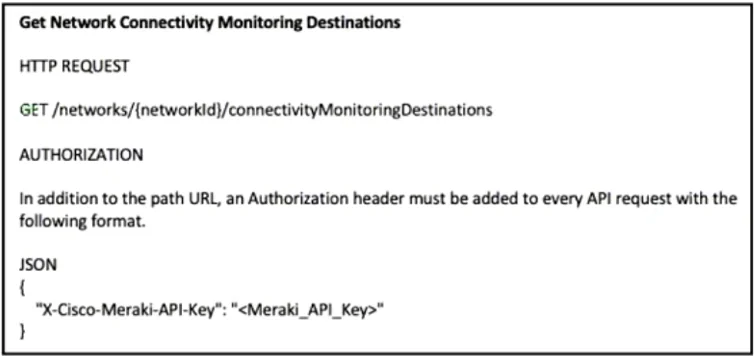
- First blank (HTTP Method): The API documentation in Exhibit 1 explicitly states 'HTTP REQUEST GET /networks/{networkId}/connectivityMonitoringDestinations'. Therefore, the Python
requestscall should userequests.get. Drag 'get' into the first blank. - Second blank (URL Path): The API path is
/networks/{networkId}/connectivityMonitoringDestinations. The script already hasbase_url + "/networks/". The next part of the path should be the network identifier, which is stored in thenetwork_idvariable. Drag 'network_id' into the second blank. - Third blank (Authorization Header Value): The documentation specifies the
X-Cisco-Meraki-API-Keyheader for authorization. The value for this header is the API key, which is stored in theapi_keyvariable in the script. Drag 'api_key' into the third blank. - Fourth blank (Additional Header Key): The provided solution image (Exhibit 3) shows 'post' dragged into this blank, making the header
"post": "application/json". While 'Accept' would be the standard HTTP header to request a JSON response type for a GET request, and 'post' as a header key is unconventional, the question's intended answer is explicitly shown in Exhibit 3. Therefore, drag 'post' into the fourth blank to match the provided solution.
Common mistakes.
- common_mistake. Common mistakes include:
- Dragging 'post' into the first blank (HTTP method): The API documentation clearly specifies a
GETrequest for this endpoint, notPOST. - Dragging 'api_key' or 'api_token' into the URL path (second blank): The URL path requires the network ID, which is stored in the
network_idvariable. API keys/tokens are for authentication, not for the path itself. - Dragging 'network_id' or 'api_token' for the API key value (third blank): The authorization header
X-Cisco-Meraki-API-Keyrequires the actual API key, stored inapi_key.network_idis an identifier, andapi_tokenis not defined or applicable here. - Dragging 'Accept' or 'Encoding' into the fourth blank (additional header key): While
Acceptwould be a semantically correct HTTP header (e.g.,"Accept": "application/json") for specifying the desired response format in aGETrequest, the provided solution image in Exhibit 3 explicitly indicates 'post' as the correct choice for this specific question. Therefore, selecting 'Accept' or 'Encoding' would be marked incorrect based on the provided answer key.
Concept tested. Understanding of RESTful API concepts (HTTP methods, URL paths, headers, authentication), and practical application of the Python requests library for making API calls.
Topics
Community Discussion
No community discussion yet for this question.