
200-901 · Question #65
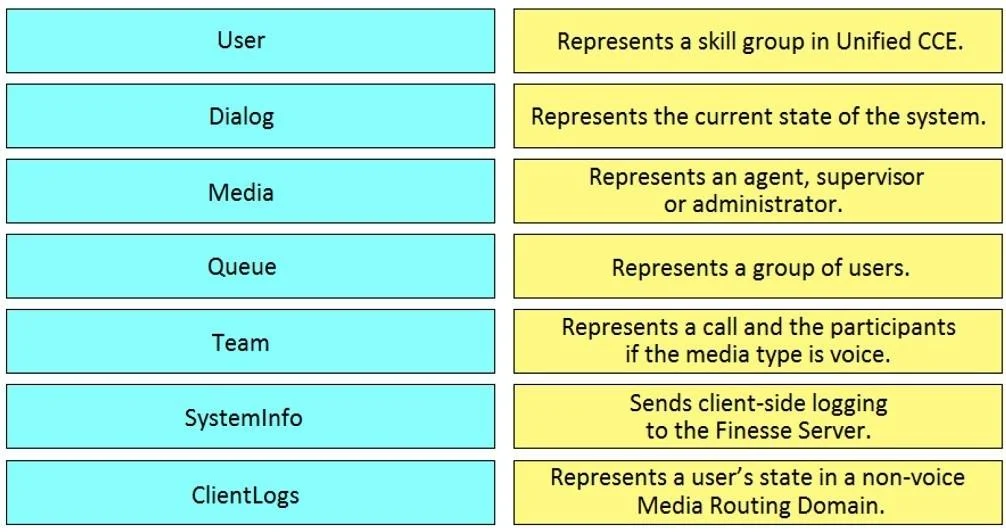
Drag and Drop Question Drag and drop the element of the Finesse API on the left onto the description of its functionally on the right. Answer:
The correct answer is Request Headers; Request Payload; HTTP Request; HTTP Response; Response Headers; Response Payload. The question tests the candidate's understanding of Cisco Finesse API elements and their core functionalities by requiring them to correctly match each element to its description.
Question
Drag and Drop Question Drag and drop the element of the Finesse API on the left onto the description of its functionally on the right. Answer:
Exhibit
Answer Area
Drag items
Correct arrangement
- Request Headers
- Request Payload
- HTTP Request
- HTTP Response
- Response Headers
- Response Payload
Explanation
The question tests the candidate's understanding of Cisco Finesse API elements and their core functionalities by requiring them to correctly match each element to its description.
Approach. The correct interaction involves dragging each Finesse API element from the unsorted list on the left to its precise functional description on the right. The correct pairings are:
- User should be dragged to 'Represents an agent, supervisor or administrator.' (The User object defines contact center personnel.)
- Dialog should be dragged to 'Represents a call and the participants if the media type is voice.' (Dialogs encapsulate active interactions like calls.)
- Media should be dragged to 'Represents a user's state in a non-voice Media Routing Domain.' (This object specifically handles non-voice interaction states.)
- Queue should be dragged to 'Represents a skill group in Unified CCE.' (In UCCE, queues are typically implemented as skill groups for routing customer interactions.)
- Team should be dragged to 'Represents a group of users.' (Teams are logical groupings of agents and supervisors.)
- SystemInfo should be dragged to 'Represents the current state of the system.' (This object provides system-wide operational status and configuration information.)
- ClientLogs should be dragged to 'Sends client-side logging to the Finesse Server.' (This API is dedicated to managing and submitting client-side log data for troubleshooting.)
Common mistakes.
- common_mistake. Common mistakes include confusing similar-sounding or related concepts. For example, incorrectly matching 'User' with 'Represents a group of users' (which is for 'Team'), or 'Team' with 'Represents an agent, supervisor or administrator'. Another common error would be interchanging 'Dialog' and 'Media' descriptions, as both relate to interactions but represent different aspects (Dialog for the interaction itself, Media for non-voice states). Mistaking 'Queue' for a direct 'group of users' instead of a 'skill group' is also a frequent mistake, as is swapping the distinct functions of 'SystemInfo' (system status) and 'ClientLogs' (sending log data). These errors arise from a lack of precise understanding of each Finesse API resource's specific role.
Concept tested. The core concept tested is the detailed understanding of Cisco Finesse API resources (User, Dialog, Media, Queue, Team, SystemInfo, ClientLogs) and their specific functionalities within a Cisco Unified Contact Center Enterprise (UCCE) or Express (UCCX) environment. It assesses knowledge essential for Finesse widget development, integration, and troubleshooting.
Topics
Community Discussion
No community discussion yet for this question.